Category: Industrial Design

5 New Flood Prevention Products

5 New Flood Prevention Products

Floods are becoming more common globally.

The main solution deployed to fight these rising water is sandbags – 1000’s upon 1000’s of sandbags made from burlap or polypropylene. Not anymore.

Explore in the news product innovations to prevent floods.

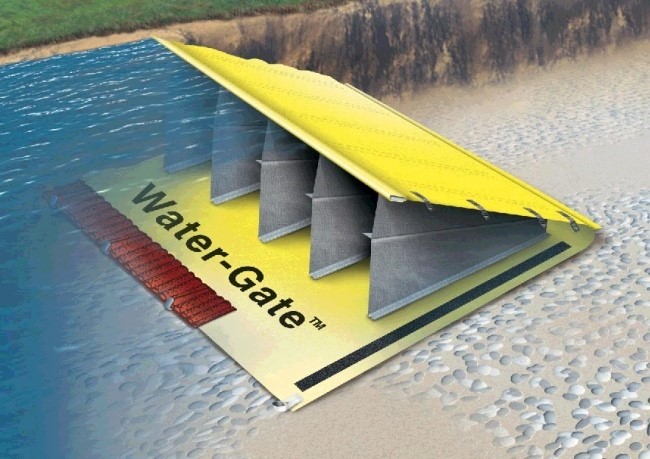
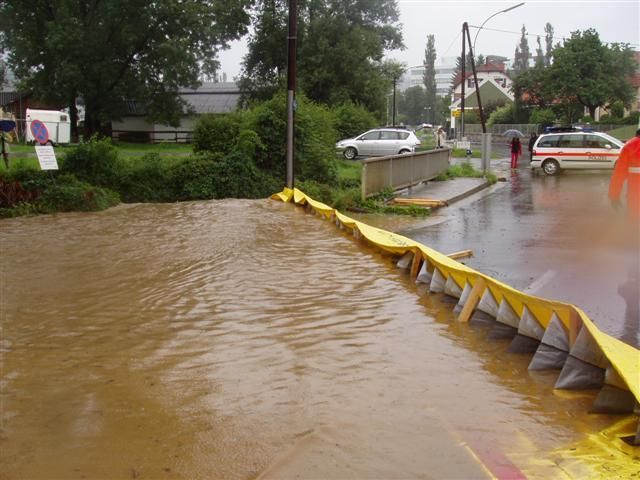
1) Water Gate: Rapid Response Flood Control System


Water gate 
is a clever PVC device that uses the pressure of oncoming water to stabilize itself. While more expensive than sandbags, it has been proven to be a highly effective means of containing flood damage. A single person can deploy the product in a few hours to protect a home, or larger devices can be purchased to protect entire areas and unrolled trucks.

The product is lighter than sandbags, reusable and doesn’t require filler material that will be contaminated after use.

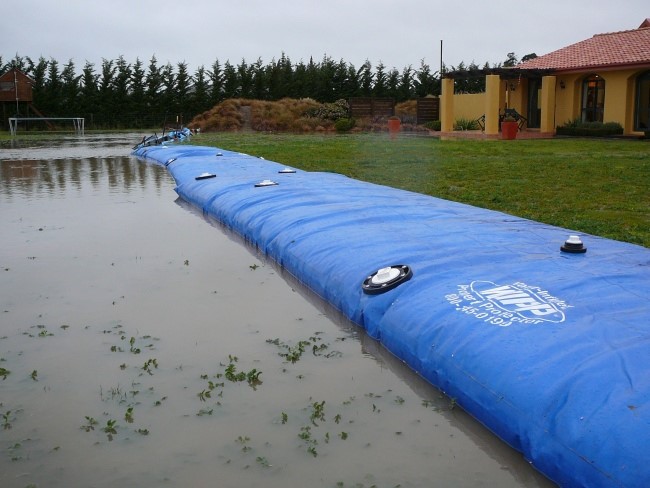
2) WIPP: Water Inflated Property Protector

The “Water Inflated Property Barrier” (WIPP) made from a long (up to 150 ft.), extremely durable, vinyl-coated polyester. The idea is to fight water with water, and WIPP does just that; essentially a long tube with an internal support structure, the system can be inflated with any nearby water source, acting as a heavy barrier against oncoming waters.

Like other systems, WIPP can be easily and quickly deployed, repaired and packed away compactly when not in use. 


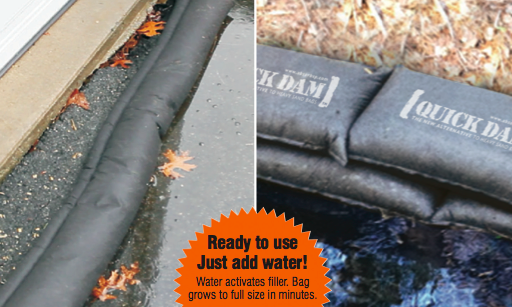
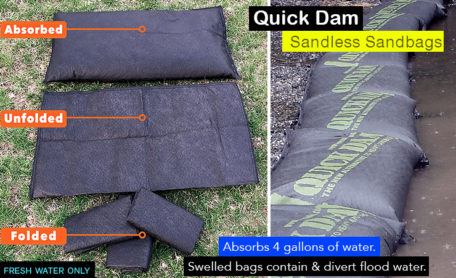
3) Quick Dam: Flood Barrier Socks

Quick Dams – water barrier socks are the fastest growing flood protection device in North America. Over the past year Quick Dam’s distribution has grown to include all major home renovation retailers (ie. Home Depot, Lowes, Rona) as well as a large Amazon store stocked with product variations.

The Quick Dam flood barriers are available in 5ft, 10ft and 17ft long pieces, suitable for all types of environments. And based on reviews so far, the product is doing a good job of keep homeowners property dry in the wake of rising flood waters.


4) Floodblock: Modular Flood Prevention Solution

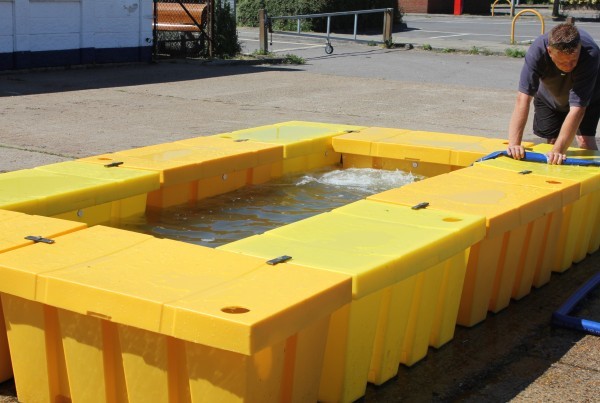
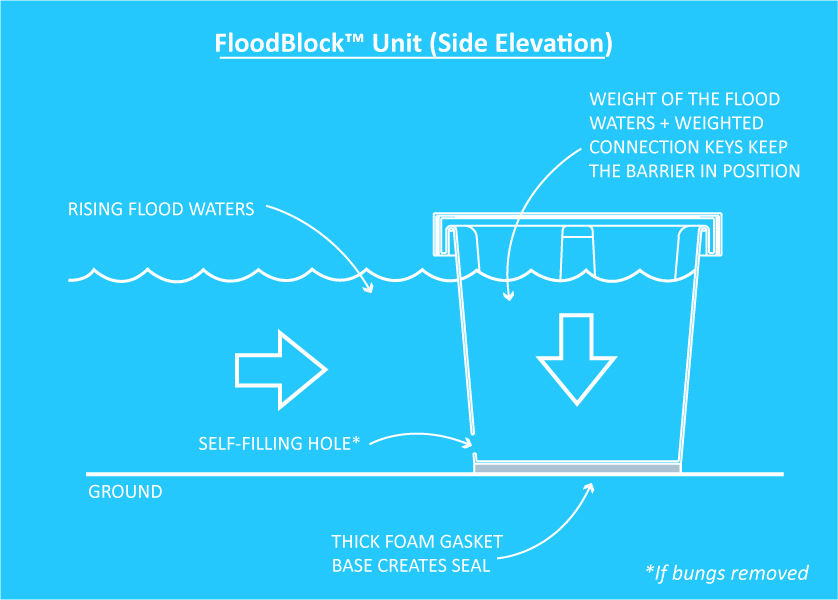
FloodBlock is another Lego-like invention that can be interlocked, stacked and positioned to protect homes and commercial spaces from flooding. The device is a self-filling crate with foam padding on the bottom creating a seal which prevents water seeping from underneath. The stacking feature ensures a minimal footprint when stored away. The simplicity of the system and its light weight means that no special training is required to assemble – and it’s a high quality, affordable solution that’s more effective than sandbags.

5) Aquobex: Heritage Floodguard system

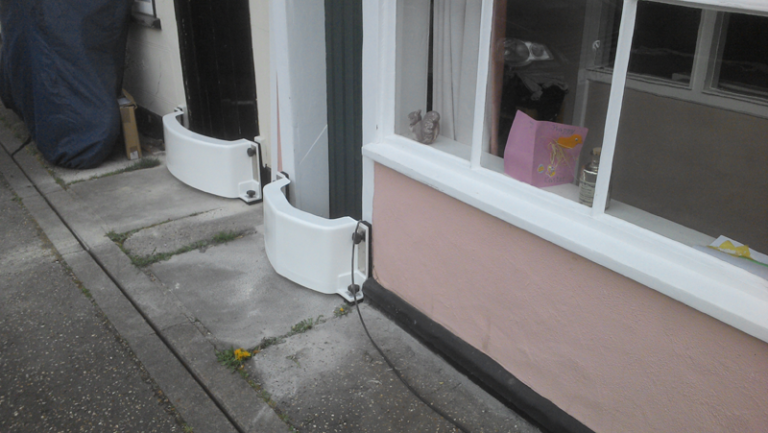
Aquobex is a global leader in fighting flood waters and offers a variety of flood devices to help both homeowners and cities deal with rising water. There Hertiage Floodguard is one of their most popular devices and the often the first line of defense to prevent entering doors and windows.

The lightweight reusable barrier provides the same protection as a permanent barrier and has helped 1000’s of homeowners stop water in in it’s tracks.

Share

Have a new product idea?

We can help take you from idea to design, prototyping, and volume manufacturing.

27 Years Experience

75+ Design Awards

1,000+ Manufactured Products

From Idea to Prototype in as Little as Six Weeks!

Ready to Start?

Published on: December 30, 2023

Glossary of Product Design Terms

Glossary of Product Design Terms

27 Years Experience

75+ Design Awards

1,000+ Manufactured Products

From Idea to Prototype in as Little as Six Weeks!

Ready to Start?

88 Product Design Terms You Need to Know

product-design-terms

If you are designing a new product, working with a product design firm or have an interest in hardware startups – knowing your way around product design terminology is critical.

For example, exploding a  BOM – may come as shock to those who don’t know BOM stands for bill of materials, and flashing it simply means showing a list of all the components in one view!

But a quick read of the most frequently used product design-related terms below will bring you up to speed, and ensure the next design engineering meeting goes smooth.

  1. Alias
    Brand of CAD software, most often used for free-form modeling and visualization. Becoming less prevalent.
  2. Animation
    A visualization comprised of moving images, usually created from 3D CAD, which allows a ‘movie’ of the design without needing physical samples. The quality of an animation can vary dramatically depending upon the application.
  3. Anthropometrics
    Study of measurements of humans. Used to inform ergonomics.
  4. Assembly
    A collection of components that are related and have interconnections. Parts joined together form an assembly. Maybe physical, also within CAD.
  5. Backend
    The later phases of a design program, closer to manufacturing. Within some organizations some of these activities are identified as engineering.
  6. Bill of materials (BOM)
    A table containing a list of the components and the quantity of each required to produce an assembly. A costed BOM includes pricing information. An indented BOM indicates how different components and sub assemblies relate to one another and the order in which they are assembled.
  7. Brief
    Instructions and requests provided to design team prior to the commencement of a project. The format can vary and may range from informal & verbal, to comprehensive document.
  8. CAD
    Computer-aided design is software used to assist with design and documentation.
  9. CMF
    Colour, material, finish.
  10. CNC
    Computer-numerically-controlled. Refers to various machinery used to produce prototypes, tools and components.
  11. Commercialization
    Commercialization is the process or cycle of introducing a new product or production method into the market. Many technologies begin in the laboratory and are not practical for commercial use in their infancy.
  12. Component
    Part. Single, discrete element within an assembly.
  13. Concept design
    Early-stage design, not all aspects are resolved, however overall intent or direction should be apparent.
  14. Contract Manufacturer (CM)
    The external company that produces parts or products to order.
  15. Control Drawing
    2D representation of a design, used to assist production. Often used in conjunction with 3D CAD data, a control drawing can provide information such as dimensions, tolerances and notes that may not be readily obtained from 3D data alone. Also called 2D drawing, engineering drawing or technical drawings. Similar to architectural ‘plan’
  16. Design Thinking
    An approach to problem-solving based upon the methodology used by designers, but (usually) applied to other disciplines, such as business and education.
  17. Detail design
    Determining and accurately documenting all the aspects of the design, largely related to the performance and manufacture of the part. Depending upon organizational structure this work may be carried out by engineers.
  18. DIA
    Design Institute of Australia.
  19. Dimension
    Distance or measurement.
  20. Drawing
    Usually refers to a precise black and white ‘line’ image often generated in CAD within a recognized format, used for communicating technical aspects of a design. See also control drawing.
  21. Eco-design
    Design with significant consideration to the environment also called green design.
  22. E.E.
    Electrical (or electronic) engineering.
  23. Ergonomics
    Application of principles that consider the effective, safe and comfortable use of a design by humans. An example would be the design of a handle based on anthropometric data and with subsequent usability testing.
  24. Exploded view
    Visual representation of an assembly, showing some or all of the components separated to illustrate the parts and their relationships to one another.
  25. FEA
    Finite-element analysis: a computer-based engineering tool for assessing structural aspects of a mechanical design.
  26. Feasibility Study
    A feasibility study is an evaluation and analysis of the potential of a proposed project, based on extensive investigation and research to support the process of decision making.
  27. Finish
    Surface treatment of component. Maybe functional and/or cosmetic, examples include polishing, painting and anodizing.
  28. Form
    The three-dimensional equivalent of Shape.
  29. Form study
    Type of prototype used to assess the external form of the design, usually full size, often in a single colour or with minimal cosmetic finishes. The ‘clays’ used in automotive design are an example.
  30. Front end
    Preliminary stages of the design process, typically where overall configuration and desired appearance are established.
  31. General Assembly (GA)
    A drawing or CAD model illustrating all the components of a finished product and their relationship to one another. May incorporate a bill of materials (BOM).
  32. Human Factors
    A phrase largely interchangeable with ‘ergonomics’, human factors relates to consideration of human users in the design of a product and environment. Some people make a distinction that ergonomics more specifically relates to the physical association between people and products.
  33. ID
    See industrial design; also internal diameter (e.g. the distance across the hole in a donut).
  34. IDEA
    International Design Excellence Award. Presented by IDSA.
  35. Ideation
    Idea generation, typically early in a project and in a relatively loose/abstract form. Brainstorming is an ideation technique.
  36. IDSA
    Industrial Designers Society of America
  37. Illustrator
    Computer software often used for 2D design work. Also used extensively by graphic designers.
  38. Industrial Design (ID)
    A term for the profession, as in the design of industrially-produced goods. Some attribute the origin of the phrase to a Kiwi c.1920, and it has been largely misunderstood by the public ever since…
    ID is generally interchangeable with product design, though industrial design (or ID) is more often used by people ‘in the know’. When a distinction is made, it is generally that whilst there is a lot of overlap, industrial design is more focused toward the earlier stages of the design process
  39. Intellectual property (IP)
    Characteristics of a design the owner may wish to protect from unauthorized use. Strategies include trade secrets and formal, legal IP protection such as utility patents & design registration.
  40. Interface
    Elements of a product via which a user receives and inputs information. On a smartphone this may be as simple as a touchscreen and a few buttons. On a motorcycle it is far more involving, with both hands and both feet operating controls, along with visual display of information.
  41. IP
    See intellectual property.
  42. ME
    Mechanical engineering.
  43. Model (including CAD)
    Representation of a design. May refer to a physical item or a representation within computer software e.g. CAD model
  44. Mould (or mold in American-English)
    Tool used to create plastic parts. Typically made of metal.
  45. Mood board
    Collection of images gathered at the outset of a project to help clarify and communicate aspects of the aesthetic of the yet-undesigned product. Interchangeable with theme board.
  46. Native
    The file type used by a given software program during normal use (creating & saving files) Example ‘.docx’ for MS Word. Native files are often not used to transfer design data, as translation formats such as STEP offer tamper resistance, revision control and do not have the interdependence that is common with CAD data.
  47. New Product Introduction (NPI)
    New product introduction is the complete process of bringing a new product to market.
  48. Original Design Manufacturer (ODM)
    Company that designs and produces goods to be sold by other brands. The design may be initiated by the ODM or may be to meet a specification provided by a brand.
  49. Original Equipment Manufacturer (OEM)
    Contract manufacturer that produces complete, finished products. Manufactures products for other brands, (to the design and specification of those brands) which the brand then distributes. Common business model, with many brands outsourcing some or all of their production (to OEMs).
  50. Off-Tool Sample (OTS)
    Initial sample created using production tooling. Used to check design and ‘tune’ tooling prior to making production quantities. Common to have at least 2 generations of OTS (OTS1, OTS2, etc.) as first OTS will often not have cosmetic finishes applied to tool.
  51. Organic
    Describes form. Soft, irregular shapes, as occur in nature.
  52. OTS
    See off-tool sample.
  53. Part
    A single element. Some products, such as a paperclip, consist of a single part. Often a product is an assembly of multiple parts.
    PCB
    A printed circuit board (PCB) mechanically supports and electrically connects electronic components using conductive tracks, pads and other features etched from copper sheets laminated onto a non-conductive substrate. PCBs can be single sided (one copper layer), double sided (two copper layers) or multi-layer.
  54. Percentile (as in ’5th percentile’)
    Term used within ergonomics to indicate a portion of the population with regard to a particular trait. Using height for example, of a sample population 50th percentile is the mid point, 5th percentile would be the shortest 5% of people within the sample group, 95th percentile the tallest 5%.
  55. Phase
    A period within a design program that is identified as having a particular focus of activity and/or outcome.
    A project may have a user-research phase, a concept phase, etc. This term is commonly used in the US, the word ‘stage’ is largely interchangeable.
  56. Pilot Run
    An initial small production run produced as a check prior to commencing full-scale production. The pilot run provides an opportunity to further refine assembly process or identify any remaining issues with the design or manufactured parts, thereby saving time & $ in the transition to full production.
  57. Pro/E
    Brand of CAD software, subsequently named ‘Wildfire’, and now ‘Creo’ (the family of products still widely referred to as Pro/E). Well-established platform for mechanical CAD with large user base.
  58. Program
    A body of design work for a single organisation, typically involving multiple projects. Alternatively a piece of computer software, increasingly called apps or applications.
  59. Project
    A specific, defined design task. In this context often a product. May also be more narrowly defined, such as a piece of stand-alone research or a conceptual exploration used to gather knowledge without necessarily being intended for production.
  60. Proposal
    Stated approach to a design project. This is a response to a brief.
  61. Prototype
    A model made during the design process to assess aspects of the design prior to manufacture. Usually physical, but may take other forms, including on-screen or even Post-it notes. For glossary of terms relating to prototyping see separate article, (coming soon!)
  62. Quality Assurance
    Quality assurance (QA) attempts to improve and stabilize production (and associated processes) to avoid, or at least minimize, issues which lead to a product’s defects.
  63. Quality Control
    Quality control (QC) is a process in which the quality of all factors involved in production is reviewed. It emphasizes testing of products to uncover defects and reporting to those who make the decision to allow or deny product release.
  64. Quality Management Systems
    A quality management system (QMS) is a collection of business processes focused on achieving quality objectives to meet customer requirements. It is expressed as the organizational structure, policies, procedures, processes and resources needed to achieve the desired standard of quality.
  65. Rapid Prototyping (RP)
    Various technologies for producing a prototype directly from 3D CAD data which produce a result far more quickly (typically within a couple of days) than traditional model-making.
  66. Rendering
    An image of a proposed design which may be generated by various means including marker pens on paper, 2D software, or 3D CAD visualisation software. The detail provided in a rendering can range from quite abstract and suggestive to photorealistic. In layman’s terms, an ‘artist’s impression’. I have no idea why the term rendering is used…
  67. Research
    May be undertaken at different times in a project, for different reasons. Common types are user research, competitor research, and research into materials and process.
  68. Rhinoceros (Rhino)
    Brand of CAD software, tends to be used for free-form modelling and visualisation.
  69. Sample
    Item demonstrating one or more characteristics of a design. Can differ from a prototype in that a sample may represent a material or process, without necessarily being in the form of the design in progress.
  70. Scale
    A ratio of size to allow documentation of designs that are too large or small to be documented effectively at true size. For example a chair may be drawn at 1:5 scale (one fifth of full size). A scale may also refer to a ruler with graduations to easily measure scaled drawings, but this is more common in architecture.
  71. Schematic
    A structural or procedural diagram, especially of an electrical or mechanical system.
  72. Sketch
    An image that is quick to generate and does not contain complete detail. Also used as an adjective, e.g. sketch model.
  73. SolidWorks
    Brand of CAD software. Widely used platform for mechanical CAD.
  74. Stage
    See phase.
  75. STEP file
    Computer file format for cross-platform transfer of 3D CAD data.
  76. Styling Freeze
    Point in time after which no further changes to the appearance are intended. This may be implicit and not formally identified.
  77. Sub assembly
    An assembly that forms part of a larger assembly. For example the display of a smartphone.
  78. Supplier
    A company that provides goods or services relating to the item being designed, typically prototype or production components. For design the term is largely interchangeable with ‘supplier’ (though this may be debated by a procurement specialist!). Supplier is more commonly used in Australia and the UK.
  79. System Architect
    System(s) architects define the architecture of a complex system in order to fulfill the technical requirements. Such design includes a breakdown of the system in components, how these components interact together, and generally what technologies they employ.
  80. System Architecture Plan
    It is the conceptual model that defines the structure, behavior, and more views of a system. An architecture description is a formal description and representation of a system, organized in a way that supports reasoning about the structures and behaviors of the system.
  81. Theme board
    See mood board.
  82. Thermal Management
    Heat generated by electronic devices and circuitry must be dissipated to improve reliability and prevent premature failure.[1] Techniques for heat dissipation can include heatsinks and fans for air cooling, and other forms of computer cooling such as liquid cooling.
  83. Thermal Simulation
    Thermal simulation calculates the theoretical temperature and heat transfer within and between components in your design and its environment. This is an important consideration of design, as many products and material have temperature dependent properties. Product safety is also a consideration—if a product or component gets too hot, you may have to design a guard over it.
  84. Tolerance
    Dimensional variation that can occur between nominally ‘identical’ components during manufacture. Tolerance may refer to a dimensioning approach to define this, or the variation observed in parts.
  85. Tool, tooling
    Catch-all phrase for dedicated elements of manufacturing equipment used for the mass production of components. Tooling is a general term which includes molds used for injection-molded plastic parts and dies used for cast metal parts. Investment in tooling often represents a major capital expense and time component of new product development programs.
  86. User
    The person or people who will use the design. A product may have multiple users, for example ‘users’ of a piece of medical equipment may include the patient, the doctor, and technical staff.
  87. Vendor
    A company that provides goods or services relating to the item being designed, typically prototype or production components. For design the term is largely interchangeable with ‘supplier’ (though this may be debated by a procurement specialist!). Vendor is more commonly used in the US.
Share

Need Help WIth Your Product Idea?

We can help take you from idea to design, prototyping, and volume manufacturing.

Published on: July 21, 2023

Changing Role of Industrial Design

Changing Role of Industrial Design

27 Years Experience

75+ Design Awards

1,000+ Manufactured Products

From Idea to Prototype in as Little as Six Weeks!
Ready to Start?


Brian Ling – the founder, blogger and mastermind behind one of our favorite industrial design blogs http://designsojourn.com put together an awesome presentation on the changing role of industrial design, way back in 2007. And it’s still relevant today.

Share

Have a new product idea?

We can help take you from idea to design, prototyping, and volume manufacturing.

Published on: February 23, 2023

What is Industrial Design?

What is Industrial Design?

27 Years Experience

75+ Design Awards

1,000+ Manufactured Products

From Idea to Prototype in as Little as Six Weeks!
Ready to Start?


Here’s a great video compilation of quotes from design luminaries giving their interpretation of design. It reflects what goes through the heads of designers when engaging in the product development process – truly inspiring.

To me Design is………

Share

Have a new product idea?

We can help take you from idea to design, prototyping, and volume manufacturing.

Published on: February 23, 2023

Biomimicry: Nature is a Product Design Genius

Biomimicry: Nature is a Product Design Genius

27 Years Experience

75+ Design Awards

1,000+ Manufactured Products

From Idea to Prototype in as Little as Six Weeks!

Ready to Start?

Solving complex design challenges by studying nature is not new. Centuries ago designers tried to imitate the flapping of bird’s wings to take flight. The device at the time was called a Ornihopter and the earliest concepts date back to Leonardo da Vinci’s design in 1485. As you may be aware, the Ornihopter didn’t exactly work out as planned, and it took 4 more centuries until inventors in France got it to take flight in 1871. Now fast forward to 2014. Biomimcry – mimicking nature to solve design problems – has become both an emerging design discipline and a buzz word that embodies sustainable design. The core philosophy is that nature, through centuries of evolution, has already solved many of the complex design problems we are grappling with today. By emulating  nature and it’s strategies and solutions we can design better solutions to human problems that are both sustainable and efficient. Watch the short video below to learn more on how Biomimicry is shaping the design of products today and tomorrow:


And if you’re looking for more inspiration on how Biomimetic designs are here to stay along with dozens of examples check out Janie Benyus TED Talk video on Biomicry in Action below. In it will not only tune you into the specular design genius of mother nature but may also give you some ideas for a new product, startup or disruptive technology!

Share

Have a new product idea?

We can help take you from idea to design, prototyping, and volume manufacturing.

Published on: October 24, 2021

Top 3 Design Mistakes Hardware Startups Make

Top 3 Design Mistakes Hardware Startups Make

27 Years Experience

75+ Design Awards

1,000+ Manufactured Products

From Idea to Prototype in as Little as Six Weeks!

Ready to Start?
Companies in need of hardware product design—particularly hardware startups looking to launch new products—have a lot riding on how they choose to bring their products to market. To ensure manufacturable design concepts, it’s crucial that companies get specialized expertise in both electronics and materials from their design, prototype and manufacturing partners.

Why is it so important?

Poorly designed and engineered products can sink not only product launches but also careers … and companies. In this blog post, Kevin Bailey, President of Ottawa-based Design 1st, discusses three of the biggest hardware product design mistakes—and how to avoid them.


When you’ve been in the hardware product development business for as long as I have—over three decades, with a hand in seeing 700-plus products developed—you’re bound to see mistakes being made.

Mistakes are not simply relics of an outmoded past. With today’s rush to exploit exciting opportunities—many in the realm of the Internet of Things—there’s a desire and a need to integrate sophisticated electronics into all kinds of products. These products are more complex. And this complexity can result in mistakes. Lots of mistakes.

Mistakes can be plentiful in complex hardware product design

Over the years, design mistakes I’ve come across have been characterized by some in the industry as logical mistakes. Natural mistakes. Common mistakes.

I see them as avoidable mistakes. Sometimes plain stupid mistakes. And often tragic mistakes.

They are mistakes resulting in failed products that have cost companies millions of dollars. They’ve cut short careers. They’ve even sunk companies. And, yes, all these mistakes were avoidable.

Allow me to explore and explain what I believe are the three biggest mistakes in hardware product design.


Mistake #3: Confusing User Interfaces

What elements of product design do users interact with most? If you’re familiar with the gadgetry of Dick Tracy, you may want to think of this handy DICK mnemonic: Displays, Indicators, Controls and Keys.

Mistake #3 revolves around badly designed, badly performing responsive elements: the parts of product design that constitute the “use” in how a user interacts with a product.

A user who says “I hate the product!” is a designer’s worst nightmare.

And users will typically have two reasons why they get mad and give up in frustration:

  1. “Don’t make me wait.”
  2. Don’t make me guess—because I feel stupid when I cannot get it to work.”

Interface design mistakes can take many forms. Like the sleek household iron whose handle-located heating controls change without the user’s intent. Or the countertop coffee machine with a video display that needs to be pressed again and again and again before it decides to work. Or any number of other product design and manufacturing quality flaws.

Best way to solve interface design issues.

How do you avoid the mistake of badly designed user interfaces—apart from suggesting, “Just do a better design”?

Start with defining the users who will be engaging with the product: where they live, how they think, what they expect the product to do.

Then design two concept ideas, create user experience (UX) models, and test your interface, keys, displays, and control locations with at least five volunteer users. In many cases, volunteers can be anyone. They will often tell you immediately what’s confusing, in the wrong place, frustrating—and also what is working fine.


How to avoid mistake #3—a brief case study: Through a total redesign of the Nuraleve neurotherapy device, the solution incorporates a user-friendly housing design. The result is a product for clinical environments that, in the client’s words, “looks fantastic and is easy to use”—and reduces patient setup time from 10 to two minutes.


As a seasoned professional designer, you can’t just pick and choose which parts of the design process you want to put your time and effort into, and ignore the things that aren’t of interest to you, or you feel are beyond your control. You need to own the whole user experience. And that goes way beyond just the end component keys and displays.

It takes a consideration of ergonomics, social bias, accommodation of disabilities, and many more factors to pull off a product that is both perfect for a user and delivers that emotionally engaging wow! factor.

It also takes a software and hardware engineering team working with you to determine what cool things are possible—and what’s not going to work. The chipsets selected, display technology type chosen, and a hundred other aspects involving careful, tradeoff decisions based on previous experience go a long way to getting it right the first time.

What’s more, succeeding at UI for hardware takes a willingness to spend the time to find that perfect design partner for your product.

One throat to choke, one firm to count on

When CEOs (and CTOs and CMOs) of hardware product companies experience the kind of mistakes I’ve explored—and get tired of different players in the design process playing the blame game and passing off mistakes to someone else—they sometimes find us.

They come to me, and our firm, looking for one throat to choke. They want one company, one person where the buck stops.

And I’m always happy to be that one throat. I know that our team will take ownership of the entire design process. Not just the fun front end, but every step of the process—right through to manufacturing set-up to work out all the little details that kill many products.

Despite its complexities, ours is a simple business. Hardware startups with product development challenges seek smart, fast, fault-free design services. They want to receive predictability and value. They want to avoid the frustrating, the costly, the catastrophic mistakes.

Getting what they want—and avoiding what they don’t want—can be as easy as 1-2-3.

Mistake #1: Faulty Sealing

Water, water everywhere…

It’s killed many a well-intentioned, otherwise well-designed product built to withstand moisture. When moisture gets into your basement, sometimes it’s as easy as buying a dehumidifier. When moisture gets into your hardware product, the results can be catastrophic.

So what’s to be done to keep water out?

Plan simple, predictable sealing points to keep water from getting in. Recognize that the larger your product, the more likely you are going to have to let it breathe.

Under pressure

If you have a large internal air volume in a product, a change in air pressure outside will change pressure on the seal. Dramatically. And quickly. For example, during shipping, a product going into the belly of an airplane can experience pressures so intense it can literally rip O-rings out of their grooves.

Remember that the larger your product, the bigger the potential problem. Temperature change will cause stress on products. Pressure change exerts force per square inch on all surfaces inside a product—like blowing up a football. The greater the volume of air inside a product, the larger the surface areas inside the product, the more force that is going to push on all the seams and joints and parting lines.

For products the size of a football, there are huge forces exerted on the product from the inside. When an airplane changes altitude (with pressure drops and rises) and when the temperature swings by 50+ degrees during the flight, products get torture-tested.

Different Types of Surfaces

And make sure you know the intricate details about the little surfaces on a product that water—under pressure or not, including precipitation—will come up against or get trapped by. Every surface must be perfect and consistent on a seal. Every nook that can collect water becomes an ice-expansion problem when it gets cold. Leaks happen at the weakest points. These are easy to identify with experienced eyes.

You need to know how much pressure a label with adhesive can resist if it covers a hole. How much pressure an O-ring in a custom-designed groove can resist. Why T-joint sealing is a “do-not-go-there” rule. Plus, many other engineering details dependent on the shape of a sealing joint, the materials involved, the type of environmental seal you have chosen, and the design plan for water ingress management.

How to avoid mistake #1—a brief case study: Now the fastest-selling adult personal massager in history, the We-Vibe began as a concept requiring a novel design and manufacturing strategy. It features a fully enclosed waterproof silicon skin that seals all internal components, including its charging connections.


Let it breathe?

For larger products, you may decide to let your product breathe (allowing moisture in and out), so it’s important to determine what internal components need protection. You need to avoid droplets of water forming internally on circuits. And you need to know what can happen if moisture is allowed to freeze inside your product. Which, of course, we recommend you avoid, as unpredictable situations lead to unnecessary risk.

Design a product so it does not fail and you give business teams the opportunity to sell the real value: the features a product is intended to provide.

OK, so that’s mistake #1. What’s next?

Mistake #2: Poorly Engineering Products that Heat Up

We’ve all experienced products that give off heat and have poorly engineered thermodynamics.

The laptop that feels so hot, you could fry an egg on it.

A product with a sickly sounding fan that whirs incessantly—until it stops. And the product stops working not long afterward.

Many product designers fail to properly engineer the correct thermodynamic solution into a product. They see three simple options:

  • Vent the heat
  • Install a fan
  • Incorporate a heatsink

Problem solved!

Not so fast.

Such designers fail to take into account the heat being generated. They fail to design a reliable continuous path to remove the heat. And the consequences are sometimes more than an overworked fan that stops. Products that create fires are not good for business. Any business.

So what are designers to do?

The heat is on

Designers need to get specialized expertise in thermodynamics from engineers who are well-experienced in designing the type of product being built.

Once the size of the product, the amount of heat being generated inside, and the exposure to all environments in which the product will be used are determined, then it’s not difficult to assess risk and determine a path for the heat to get out of the product.

As a designer, you can decide to use fans. That’s easy. But what if your product is tiny and must be sealed?  Fans are out.

Yes, you can heatsink a source of the heat, to spread out the heat locally. (Generally, microchips and electronic components on printed circuit boards are the sources of this heat). Heatsinks inside a product spread the heat away from the chips. But with the heat still inside the product, you still have a potential problem.

Solution for Thermal Issues

The solution? A system architect who understands heat flows and can take the heat from the source to the outside—without heating everything on the way.

As an architect of heat flow, think about steady state and to what temperature all parts can rise. A common example: a laptop sits on a bed, then has the bed covers thrown over it. Tough environment. Very little air flow.

After three hours, what’s the surface temperature of the product? What about the chips inside? As designers, we need to ask if that temperature is safe for the materials around it.

Can it stay like this for three years and have the electronics still run properly? If not, we need to reduce heat or find a better heat path architecture.

 

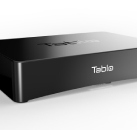
How to avoid mistake #2—a brief case study: Having entered the market as the only DVR with a silent passive heatsink—plus industry-leading low defect rates—the Tablo TV OTA digital video recorder has continued gaining mass-market acceptance. (With human touch pain tolerance in the 40° C range for outside surfaces, this heatsink technique has now become common on most TV network boxes.)


With the use of finite element simulation tools, plus experience in materials, natural convection, and the kinds of situations in which products must thrive and survive, you can—in most cases—find an acceptable solution the first time around.

Too often, people start the thermal planning after the product design is complete—and a full re-design is necessary.

Now onto the final big mistake.


Mistake #3: Confusing User Interfaces

What elements of product design do users interact with most? If you’re familiar with the gadgetry of Dick Tracy, you may want to think of this handy DICK mnemonic: Displays, Indicators, Controls and Keys.

Mistake #3 revolves around badly designed, badly performing responsive elements: the parts of product design that constitute the “use” in how a user interacts with a product.

A user who says “I hate the product!” is a designer’s worst nightmare.

And users will typically have two reasons why they get mad and give up in frustration:

  1. “Don’t make me wait.”
  2. Don’t make me guess—because I feel stupid when I cannot get it to work.”

Interface design mistakes can take many forms. Like the sleek household iron whose handle-located heating controls change without the user’s intent. Or the countertop coffee machine with a video display that needs to be pressed again and again and again before it decides to work. Or any number of other product design and manufacturing quality flaws.

Best way to solve interface design issues.

How do you avoid the mistake of badly designed user interfaces—apart from suggesting, “Just do a better design”?

Start with defining the users who will be engaging with the product: where they live, how they think, what they expect the product to do.

Then design two concept ideas, create user experience (UX) models, and test your interface, keys, displays, and control locations with at least five volunteer users. In many cases, volunteers can be anyone. They will often tell you immediately what’s confusing, in the wrong place, frustrating—and also what is working fine.


How to avoid mistake #3—a brief case study: Through a total redesign of the Nuraleve neurotherapy device, the solution incorporates a user-friendly housing design. The result is a product for clinical environments that, in the client’s words, “looks fantastic and is easy to use”—and reduces patient setup time from 10 to two minutes.


As a seasoned professional designer, you can’t just pick and choose which parts of the design process you want to put your time and effort into, and ignore the things that aren’t of interest to you, or you feel are beyond your control. You need to own the whole user experience. And that goes way beyond just the end component keys and displays.

It takes a consideration of ergonomics, social bias, accommodation of disabilities, and many more factors to pull off a product that is both perfect for a user and delivers that emotionally engaging wow! factor.

It also takes a software and hardware engineering team working with you to determine what cool things are possible—and what’s not going to work. The chipsets selected, display technology type chosen, and a hundred other aspects involving careful, tradeoff decisions based on previous experience go a long way to getting it right the first time.

What’s more, succeeding at UI for hardware takes a willingness to spend the time to find that perfect design partner for your product.

One throat to choke, one firm to count on.

When CEOs (and CTOs and CMOs) of hardware product companies experience the kind of mistakes I’ve explored—and get tired of different players in the design process playing the blame game and passing off mistakes to someone else—they sometimes find us.

They come to me, and our firm, looking for one throat to choke. They want one company, one person where the buck stops.

And I’m always happy to be that one throat. I know that our team will take ownership of the entire design process. Not just the fun front end, but every step of the process—right through to manufacturing set-up to work out all the little details that kill many products.

Despite its complexities, ours is a simple business. Hardware startups with product development challenges seek smart, fast, fault-free design services. They want to receive predictability and value. They want to avoid the frustrating, the costly, the catastrophic mistakes.

Getting what they want—and avoiding what they don’t want—can be as easy as 1-2-3.

 
Share

Have a new product idea?

We can help take you from idea to design, prototyping, and volume manufacturing.

Published on: January 9, 2018

Industrial Design Visionary: Braun or Apple?

Industrial Design Visionary: Braun or Apple?

27 Years Experience

75+ Design Awards

1,000+ Manufactured Products

From Idea to Prototype in as Little as Six Weeks!

Ready to Start?

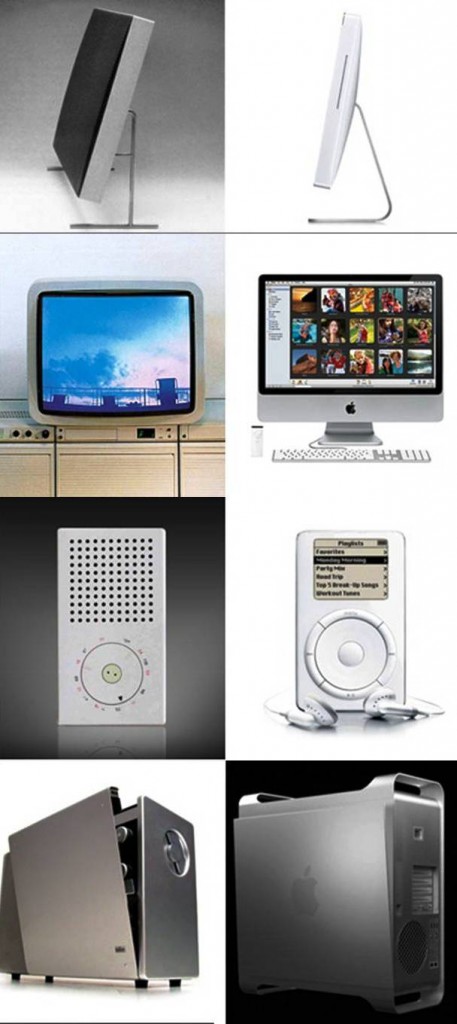
Product design plays a vital role in shaping our experiences with technology. In the realm of iconic design, two companies stand out: Braun and Apple. Braun, a German consumer products company, pioneered minimalist design principles in the mid-20th century, while Apple, an American tech giant, popularized sleek and minimalist design aesthetics in the modern era. This article explores the design differences between Braun and Apple and how Apple drew inspiration from Braun’s design philosophy.

Braun: The Pioneer of Minimalist Design:

Braun, founded in 1921, gained recognition for its commitment to minimalist design principles. Under the leadership of influential industrial designer Dieter Rams, Braun products embraced simplicity, functionality, and aesthetic appeal. Rams developed his famous “10 Principles of Good Design,” which included concepts such as “less is more” and “good design is innovative.” Braun’s products featured clean lines, intuitive interfaces, and a focus on user experience.

Apple: Building on Braun’s Legacy:

When Apple burst onto the tech scene in the late 1970s, it introduced a new era of consumer electronics. Apple’s co-founder, Steve Jobs, drew inspiration from Braun’s design philosophy and incorporated similar principles into Apple’s product lineup. Jobs admired Rams’ work and once stated, “We have always been shameless about stealing great ideas.” Apple products, like the Macintosh and subsequent devices, showcased minimalism, simplicity, and attention to detail.

Form Follows Function:

Both Braun and Apple share a common belief in the principle of “form follows function.” This design approach emphasizes that the design of a product should primarily serve its purpose and enhance its usability. Braun’s products, such as radios, shavers, and calculators, were characterized by their functional elegance and a reduction of unnecessary elements. Apple’s devices, like the iPhone, iPad, and MacBook, follow a similar design philosophy, prioritizing simplicity and user-friendly interfaces.

Simplicity in User Interface:

Braun and Apple recognize the importance of simplicity in user interfaces. Braun’s devices featured clear markings, logical layouts, and intuitive controls. Apple expanded on this concept by developing user interfaces that were visually appealing, easy to navigate, and focused on delivering a seamless user experience. The clean and minimalistic interfaces found in Apple’s iOS and macOS have become industry standards, reflecting the influence of Braun’s design legacy.

Material Choices and Attention to Detail:

Both Braun and Apple pay meticulous attention to material choices and manufacturing processes. Braun’s products often featured high-quality materials, such as brushed aluminum and matte plastics, which conveyed durability and sophistication. Apple adopted a similar approach, utilizing premium materials like aluminum, glass, and ceramic in their products. This emphasis on craftsmanship and material selection has become synonymous with both brands.


Braun’s early foray into minimalist design left an indelible mark on the world of product design. Apple, with its penchant for innovation and aesthetic refinement, built upon Braun’s legacy, ushering in an era of sleek and minimalist consumer electronics. The influence of Braun’s design philosophy can be seen in Apple’s product lineup, which continues to captivate users with its functional elegance and attention to detail. As technology continues to evolve, the enduring impact of Braun’s design principles and Apple’s refinement will shape the future of product design for generations to come.

Share

Have a new product idea?

We can help take you from idea to design, prototyping, and volume manufacturing.

Published on: January 4, 2013