Category: Articles

5 New Flood Prevention Products

5 New Flood Prevention Products

Floods are becoming more common globally.

The main solution deployed to fight these rising water is sandbags – 1000’s upon 1000’s of sandbags made from burlap or polypropylene. Not anymore.

Explore in the news product innovations to prevent floods.

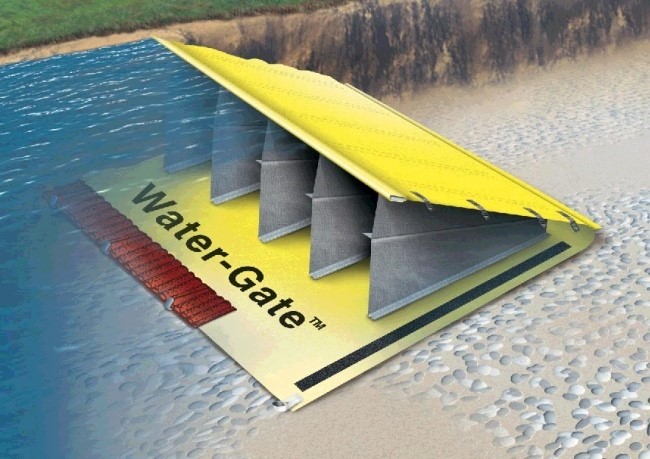
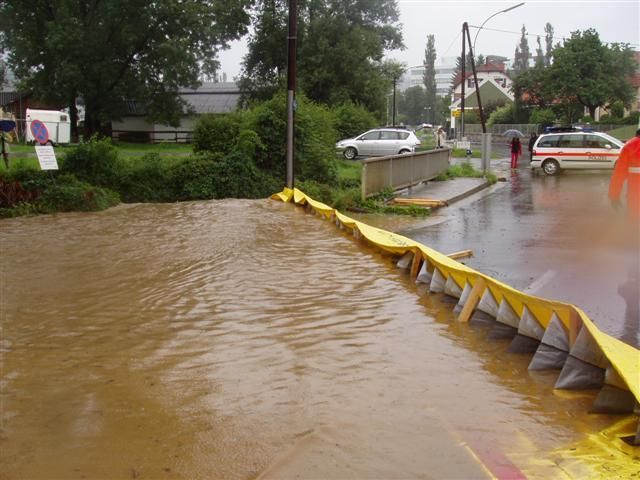
1) Water Gate: Rapid Response Flood Control System


Water gate 
is a clever PVC device that uses the pressure of oncoming water to stabilize itself. While more expensive than sandbags, it has been proven to be a highly effective means of containing flood damage. A single person can deploy the product in a few hours to protect a home, or larger devices can be purchased to protect entire areas and unrolled trucks.

The product is lighter than sandbags, reusable and doesn’t require filler material that will be contaminated after use.

2) WIPP: Water Inflated Property Protector

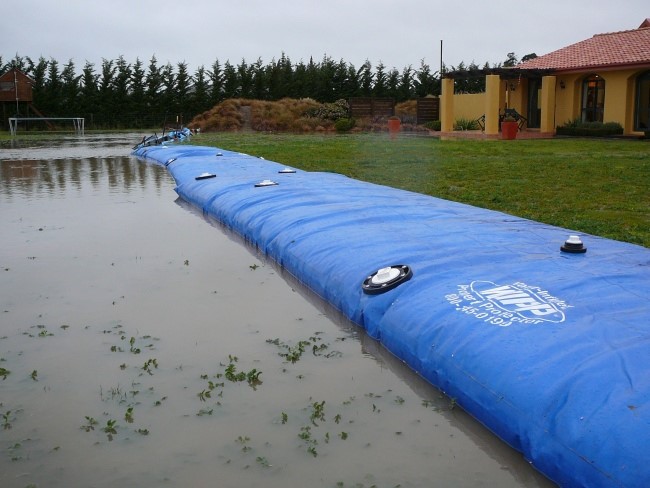
The “Water Inflated Property Barrier” (WIPP) made from a long (up to 150 ft.), extremely durable, vinyl-coated polyester. The idea is to fight water with water, and WIPP does just that; essentially a long tube with an internal support structure, the system can be inflated with any nearby water source, acting as a heavy barrier against oncoming waters.

Like other systems, WIPP can be easily and quickly deployed, repaired and packed away compactly when not in use. 


3) Quick Dam: Flood Barrier Socks

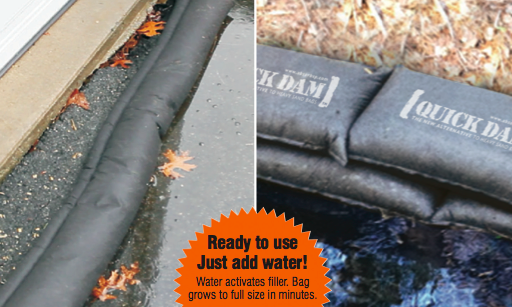
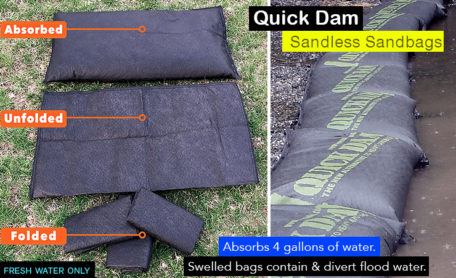
Quick Dams – water barrier socks are the fastest growing flood protection device in North America. Over the past year Quick Dam’s distribution has grown to include all major home renovation retailers (ie. Home Depot, Lowes, Rona) as well as a large Amazon store stocked with product variations.

The Quick Dam flood barriers are available in 5ft, 10ft and 17ft long pieces, suitable for all types of environments. And based on reviews so far, the product is doing a good job of keep homeowners property dry in the wake of rising flood waters.


4) Floodblock: Modular Flood Prevention Solution

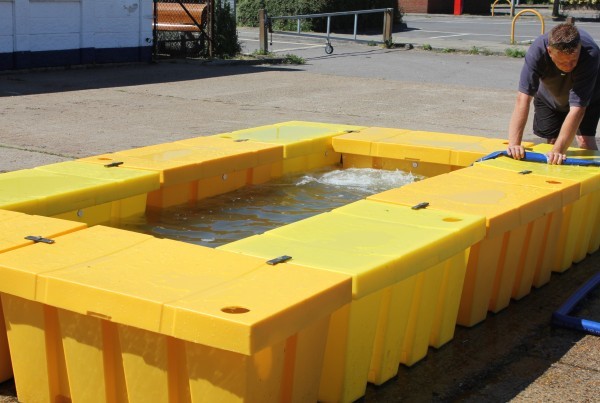
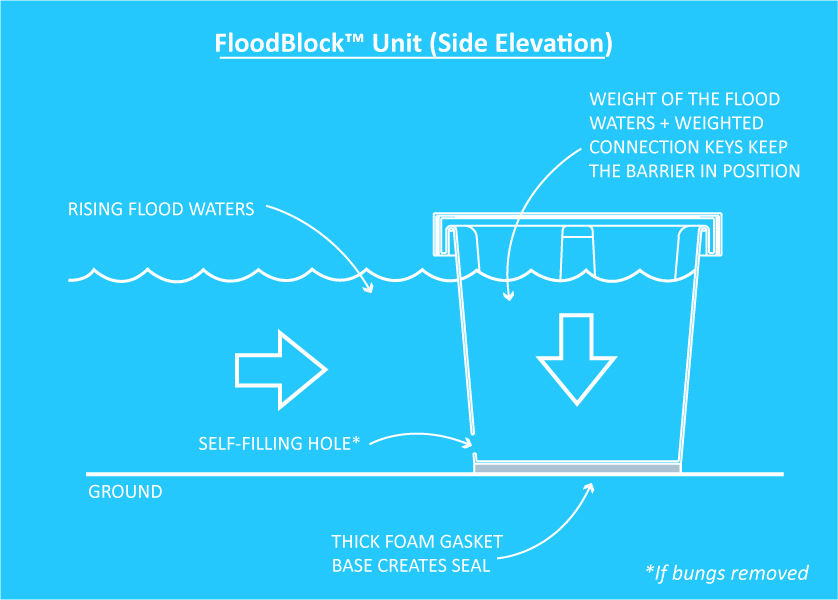
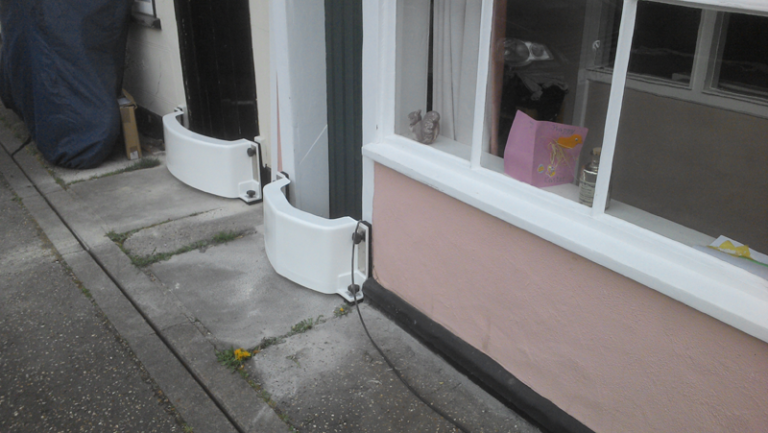
FloodBlock is another Lego-like invention that can be interlocked, stacked and positioned to protect homes and commercial spaces from flooding. The device is a self-filling crate with foam padding on the bottom creating a seal which prevents water seeping from underneath. The stacking feature ensures a minimal footprint when stored away. The simplicity of the system and its light weight means that no special training is required to assemble – and it’s a high quality, affordable solution that’s more effective than sandbags.

5) Aquobex: Heritage Floodguard system

Aquobex is a global leader in fighting flood waters and offers a variety of flood devices to help both homeowners and cities deal with rising water. There Hertiage Floodguard is one of their most popular devices and the often the first line of defense to prevent entering doors and windows.

The lightweight reusable barrier provides the same protection as a permanent barrier and has helped 1000’s of homeowners stop water in in it’s tracks.

Share

Have a new product idea?

We can help take you from idea to design, prototyping, and volume manufacturing.

27 Years Experience

75+ Design Awards

1,000+ Manufactured Products

From Idea to Prototype in as Little as Six Weeks!

Ready to Start?

Published on: December 30, 2023

Glossary of Product Design Terms

Glossary of Product Design Terms

27 Years Experience

75+ Design Awards

1,000+ Manufactured Products

From Idea to Prototype in as Little as Six Weeks!

Ready to Start?

88 Product Design Terms You Need to Know

product-design-terms

If you are designing a new product, working with a product design firm or have an interest in hardware startups – knowing your way around product design terminology is critical.

For example, exploding a  BOM – may come as shock to those who don’t know BOM stands for bill of materials, and flashing it simply means showing a list of all the components in one view!

But a quick read of the most frequently used product design-related terms below will bring you up to speed, and ensure the next design engineering meeting goes smooth.

  1. Alias
    Brand of CAD software, most often used for free-form modeling and visualization. Becoming less prevalent.
  2. Animation
    A visualization comprised of moving images, usually created from 3D CAD, which allows a ‘movie’ of the design without needing physical samples. The quality of an animation can vary dramatically depending upon the application.
  3. Anthropometrics
    Study of measurements of humans. Used to inform ergonomics.
  4. Assembly
    A collection of components that are related and have interconnections. Parts joined together form an assembly. Maybe physical, also within CAD.
  5. Backend
    The later phases of a design program, closer to manufacturing. Within some organizations some of these activities are identified as engineering.
  6. Bill of materials (BOM)
    A table containing a list of the components and the quantity of each required to produce an assembly. A costed BOM includes pricing information. An indented BOM indicates how different components and sub assemblies relate to one another and the order in which they are assembled.
  7. Brief
    Instructions and requests provided to design team prior to the commencement of a project. The format can vary and may range from informal & verbal, to comprehensive document.
  8. CAD
    Computer-aided design is software used to assist with design and documentation.
  9. CMF
    Colour, material, finish.
  10. CNC
    Computer-numerically-controlled. Refers to various machinery used to produce prototypes, tools and components.
  11. Commercialization
    Commercialization is the process or cycle of introducing a new product or production method into the market. Many technologies begin in the laboratory and are not practical for commercial use in their infancy.
  12. Component
    Part. Single, discrete element within an assembly.
  13. Concept design
    Early-stage design, not all aspects are resolved, however overall intent or direction should be apparent.
  14. Contract Manufacturer (CM)
    The external company that produces parts or products to order.
  15. Control Drawing
    2D representation of a design, used to assist production. Often used in conjunction with 3D CAD data, a control drawing can provide information such as dimensions, tolerances and notes that may not be readily obtained from 3D data alone. Also called 2D drawing, engineering drawing or technical drawings. Similar to architectural ‘plan’
  16. Design Thinking
    An approach to problem-solving based upon the methodology used by designers, but (usually) applied to other disciplines, such as business and education.
  17. Detail design
    Determining and accurately documenting all the aspects of the design, largely related to the performance and manufacture of the part. Depending upon organizational structure this work may be carried out by engineers.
  18. DIA
    Design Institute of Australia.
  19. Dimension
    Distance or measurement.
  20. Drawing
    Usually refers to a precise black and white ‘line’ image often generated in CAD within a recognized format, used for communicating technical aspects of a design. See also control drawing.
  21. Eco-design
    Design with significant consideration to the environment also called green design.
  22. E.E.
    Electrical (or electronic) engineering.
  23. Ergonomics
    Application of principles that consider the effective, safe and comfortable use of a design by humans. An example would be the design of a handle based on anthropometric data and with subsequent usability testing.
  24. Exploded view
    Visual representation of an assembly, showing some or all of the components separated to illustrate the parts and their relationships to one another.
  25. FEA
    Finite-element analysis: a computer-based engineering tool for assessing structural aspects of a mechanical design.
  26. Feasibility Study
    A feasibility study is an evaluation and analysis of the potential of a proposed project, based on extensive investigation and research to support the process of decision making.
  27. Finish
    Surface treatment of component. Maybe functional and/or cosmetic, examples include polishing, painting and anodizing.
  28. Form
    The three-dimensional equivalent of Shape.
  29. Form study
    Type of prototype used to assess the external form of the design, usually full size, often in a single colour or with minimal cosmetic finishes. The ‘clays’ used in automotive design are an example.
  30. Front end
    Preliminary stages of the design process, typically where overall configuration and desired appearance are established.
  31. General Assembly (GA)
    A drawing or CAD model illustrating all the components of a finished product and their relationship to one another. May incorporate a bill of materials (BOM).
  32. Human Factors
    A phrase largely interchangeable with ‘ergonomics’, human factors relates to consideration of human users in the design of a product and environment. Some people make a distinction that ergonomics more specifically relates to the physical association between people and products.
  33. ID
    See industrial design; also internal diameter (e.g. the distance across the hole in a donut).
  34. IDEA
    International Design Excellence Award. Presented by IDSA.
  35. Ideation
    Idea generation, typically early in a project and in a relatively loose/abstract form. Brainstorming is an ideation technique.
  36. IDSA
    Industrial Designers Society of America
  37. Illustrator
    Computer software often used for 2D design work. Also used extensively by graphic designers.
  38. Industrial Design (ID)
    A term for the profession, as in the design of industrially-produced goods. Some attribute the origin of the phrase to a Kiwi c.1920, and it has been largely misunderstood by the public ever since…
    ID is generally interchangeable with product design, though industrial design (or ID) is more often used by people ‘in the know’. When a distinction is made, it is generally that whilst there is a lot of overlap, industrial design is more focused toward the earlier stages of the design process
  39. Intellectual property (IP)
    Characteristics of a design the owner may wish to protect from unauthorized use. Strategies include trade secrets and formal, legal IP protection such as utility patents & design registration.
  40. Interface
    Elements of a product via which a user receives and inputs information. On a smartphone this may be as simple as a touchscreen and a few buttons. On a motorcycle it is far more involving, with both hands and both feet operating controls, along with visual display of information.
  41. IP
    See intellectual property.
  42. ME
    Mechanical engineering.
  43. Model (including CAD)
    Representation of a design. May refer to a physical item or a representation within computer software e.g. CAD model
  44. Mould (or mold in American-English)
    Tool used to create plastic parts. Typically made of metal.
  45. Mood board
    Collection of images gathered at the outset of a project to help clarify and communicate aspects of the aesthetic of the yet-undesigned product. Interchangeable with theme board.
  46. Native
    The file type used by a given software program during normal use (creating & saving files) Example ‘.docx’ for MS Word. Native files are often not used to transfer design data, as translation formats such as STEP offer tamper resistance, revision control and do not have the interdependence that is common with CAD data.
  47. New Product Introduction (NPI)
    New product introduction is the complete process of bringing a new product to market.
  48. Original Design Manufacturer (ODM)
    Company that designs and produces goods to be sold by other brands. The design may be initiated by the ODM or may be to meet a specification provided by a brand.
  49. Original Equipment Manufacturer (OEM)
    Contract manufacturer that produces complete, finished products. Manufactures products for other brands, (to the design and specification of those brands) which the brand then distributes. Common business model, with many brands outsourcing some or all of their production (to OEMs).
  50. Off-Tool Sample (OTS)
    Initial sample created using production tooling. Used to check design and ‘tune’ tooling prior to making production quantities. Common to have at least 2 generations of OTS (OTS1, OTS2, etc.) as first OTS will often not have cosmetic finishes applied to tool.
  51. Organic
    Describes form. Soft, irregular shapes, as occur in nature.
  52. OTS
    See off-tool sample.
  53. Part
    A single element. Some products, such as a paperclip, consist of a single part. Often a product is an assembly of multiple parts.
    PCB
    A printed circuit board (PCB) mechanically supports and electrically connects electronic components using conductive tracks, pads and other features etched from copper sheets laminated onto a non-conductive substrate. PCBs can be single sided (one copper layer), double sided (two copper layers) or multi-layer.
  54. Percentile (as in ’5th percentile’)
    Term used within ergonomics to indicate a portion of the population with regard to a particular trait. Using height for example, of a sample population 50th percentile is the mid point, 5th percentile would be the shortest 5% of people within the sample group, 95th percentile the tallest 5%.
  55. Phase
    A period within a design program that is identified as having a particular focus of activity and/or outcome.
    A project may have a user-research phase, a concept phase, etc. This term is commonly used in the US, the word ‘stage’ is largely interchangeable.
  56. Pilot Run
    An initial small production run produced as a check prior to commencing full-scale production. The pilot run provides an opportunity to further refine assembly process or identify any remaining issues with the design or manufactured parts, thereby saving time & $ in the transition to full production.
  57. Pro/E
    Brand of CAD software, subsequently named ‘Wildfire’, and now ‘Creo’ (the family of products still widely referred to as Pro/E). Well-established platform for mechanical CAD with large user base.
  58. Program
    A body of design work for a single organisation, typically involving multiple projects. Alternatively a piece of computer software, increasingly called apps or applications.
  59. Project
    A specific, defined design task. In this context often a product. May also be more narrowly defined, such as a piece of stand-alone research or a conceptual exploration used to gather knowledge without necessarily being intended for production.
  60. Proposal
    Stated approach to a design project. This is a response to a brief.
  61. Prototype
    A model made during the design process to assess aspects of the design prior to manufacture. Usually physical, but may take other forms, including on-screen or even Post-it notes. For glossary of terms relating to prototyping see separate article, (coming soon!)
  62. Quality Assurance
    Quality assurance (QA) attempts to improve and stabilize production (and associated processes) to avoid, or at least minimize, issues which lead to a product’s defects.
  63. Quality Control
    Quality control (QC) is a process in which the quality of all factors involved in production is reviewed. It emphasizes testing of products to uncover defects and reporting to those who make the decision to allow or deny product release.
  64. Quality Management Systems
    A quality management system (QMS) is a collection of business processes focused on achieving quality objectives to meet customer requirements. It is expressed as the organizational structure, policies, procedures, processes and resources needed to achieve the desired standard of quality.
  65. Rapid Prototyping (RP)
    Various technologies for producing a prototype directly from 3D CAD data which produce a result far more quickly (typically within a couple of days) than traditional model-making.
  66. Rendering
    An image of a proposed design which may be generated by various means including marker pens on paper, 2D software, or 3D CAD visualisation software. The detail provided in a rendering can range from quite abstract and suggestive to photorealistic. In layman’s terms, an ‘artist’s impression’. I have no idea why the term rendering is used…
  67. Research
    May be undertaken at different times in a project, for different reasons. Common types are user research, competitor research, and research into materials and process.
  68. Rhinoceros (Rhino)
    Brand of CAD software, tends to be used for free-form modelling and visualisation.
  69. Sample
    Item demonstrating one or more characteristics of a design. Can differ from a prototype in that a sample may represent a material or process, without necessarily being in the form of the design in progress.
  70. Scale
    A ratio of size to allow documentation of designs that are too large or small to be documented effectively at true size. For example a chair may be drawn at 1:5 scale (one fifth of full size). A scale may also refer to a ruler with graduations to easily measure scaled drawings, but this is more common in architecture.
  71. Schematic
    A structural or procedural diagram, especially of an electrical or mechanical system.
  72. Sketch
    An image that is quick to generate and does not contain complete detail. Also used as an adjective, e.g. sketch model.
  73. SolidWorks
    Brand of CAD software. Widely used platform for mechanical CAD.
  74. Stage
    See phase.
  75. STEP file
    Computer file format for cross-platform transfer of 3D CAD data.
  76. Styling Freeze
    Point in time after which no further changes to the appearance are intended. This may be implicit and not formally identified.
  77. Sub assembly
    An assembly that forms part of a larger assembly. For example the display of a smartphone.
  78. Supplier
    A company that provides goods or services relating to the item being designed, typically prototype or production components. For design the term is largely interchangeable with ‘supplier’ (though this may be debated by a procurement specialist!). Supplier is more commonly used in Australia and the UK.
  79. System Architect
    System(s) architects define the architecture of a complex system in order to fulfill the technical requirements. Such design includes a breakdown of the system in components, how these components interact together, and generally what technologies they employ.
  80. System Architecture Plan
    It is the conceptual model that defines the structure, behavior, and more views of a system. An architecture description is a formal description and representation of a system, organized in a way that supports reasoning about the structures and behaviors of the system.
  81. Theme board
    See mood board.
  82. Thermal Management
    Heat generated by electronic devices and circuitry must be dissipated to improve reliability and prevent premature failure.[1] Techniques for heat dissipation can include heatsinks and fans for air cooling, and other forms of computer cooling such as liquid cooling.
  83. Thermal Simulation
    Thermal simulation calculates the theoretical temperature and heat transfer within and between components in your design and its environment. This is an important consideration of design, as many products and material have temperature dependent properties. Product safety is also a consideration—if a product or component gets too hot, you may have to design a guard over it.
  84. Tolerance
    Dimensional variation that can occur between nominally ‘identical’ components during manufacture. Tolerance may refer to a dimensioning approach to define this, or the variation observed in parts.
  85. Tool, tooling
    Catch-all phrase for dedicated elements of manufacturing equipment used for the mass production of components. Tooling is a general term which includes molds used for injection-molded plastic parts and dies used for cast metal parts. Investment in tooling often represents a major capital expense and time component of new product development programs.
  86. User
    The person or people who will use the design. A product may have multiple users, for example ‘users’ of a piece of medical equipment may include the patient, the doctor, and technical staff.
  87. Vendor
    A company that provides goods or services relating to the item being designed, typically prototype or production components. For design the term is largely interchangeable with ‘supplier’ (though this may be debated by a procurement specialist!). Vendor is more commonly used in the US.
Share

Need Help WIth Your Product Idea?

We can help take you from idea to design, prototyping, and volume manufacturing.

Published on: July 21, 2023

9 Examples of Hardware Startups Founded by Doctors

9 Examples of Hardware Startups Founded by Doctors

27 Years Experience

75+ Design Awards

1,000+ Manufactured Products

From Idea to Prototype in as Little as Six Weeks!

Ready to Start?

Doctor are inventing successful new medical devices.

Entrepreneurial doctors across North America are driving medical innovation forward across a variety of niches including cardiology, orthopedics, dentistry, pediatrics and DNA analysis.

Explore 9 medical devices startups founded by doctors:

Montreal-based orthopedic surgeon Dr. Edward Harvey saw an urgent patient need to improve diagnosis of Acute Compartment Syndrome (ACS), a limb-threatening muscle condition that occurs within 48 hours of a trauma. MY01 is his solution: a real-time patient monitoring hardware device and companion application.

Fun Fact: My01 was selected as MedTech Top 50 Global Innovator.

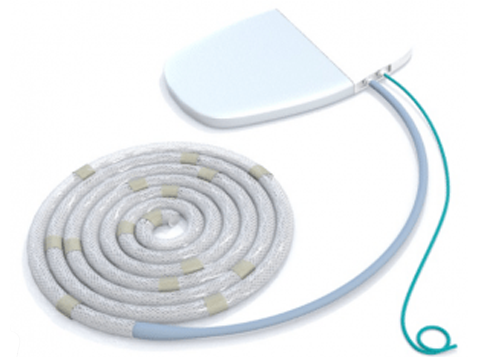
Toronto-based Cardiologist Dr. Yair Feld co-founded Paragate Medical to develop his idea for an implantable device that would limit pathologic fluid overload, a major symptom of heart failure and kidney disease. The device works through continuous clearance of systemic congestion.

Fun Fact: Paragate Medical was selected as a MedTech Top 50 Global Innovator for its medical device.

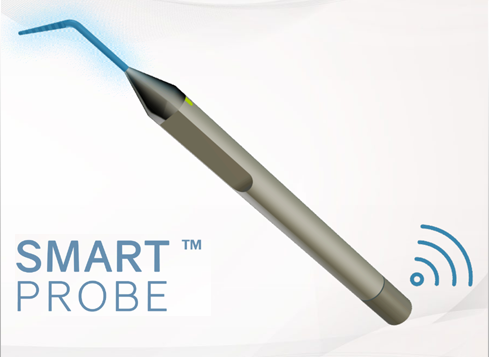
Ottawa based dental surgeon Dr. Marc Lamarre saw an opportunity to improve dental charting and periodontal probing. The current methods use paper charts and a metal probe — the gold standard for over 120 years. Dr. Lamarre’s solution was a 3D voice-activated charting system and digital probe that he is bringing to market with help from Design 1st.

Fun Fact: Cumulus Dental is in the middle of clinical trials and plans to launch in 2019.

Harvard-educated, Toronto-based physician Julielynn Wong founded 3D4MD in 2011 to bring affordable medical tools to support medical care worldwide. The solution was a 3D printing system approved by Health Canada and the FDA that prints medical tools, supplies and equipment on demand, anywhere in the world – or space.

Fun Fact: 3D4MD was used on the International Space Station to 3D print a finger splint

Toronto-based reconstructive surgeon Dr. Podolsky wanted to bridge the gap between theory and training on real patients for cleft palate repair surgery.  The solution was a life-like cleft palate simulator, a physical model that can be used with real surgical instruments in an operating room setting.

Fun Fact: Dr. Podolsky’s received a $25,00o Joule Innovation grant to help bring his idea to market.

Toronto-based cardiologist Dr. Brian Courtney saw an opportunity to use new medical image guidance systems to improve cardiovascular procedures to make common procedures faster and safer. The solution was an intravascular coronary imaging system that can visualize blood flow in 3D, giving a clear picture to the surgical physician.

Fun Fact: Conavi announced first clinical use of their technology in August 2018.

Ottawa-based pediatrician Dr. Matthew Bromwich knew the importance of endoscopy video for patient care and resident training but found getting access to video equipment difficult. The solution he invented was the Health Canada approved CLEARSCOPE Adaptor, an endoscope attachment that uses a smartphones HD camera.

Fun Fact: The CLEARSCOPE sells across the globe with distributors in every continent.

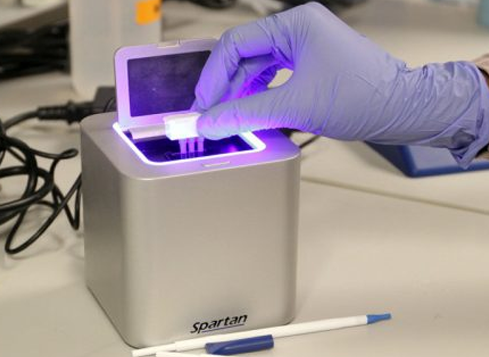
University of Ottawa educated physician Dr. Paul Lem was frustrated with the status quo of DNA analysis, a process that was slow, complex and expensive. Dr. Lem’s solution was to take DNA analysis out of the lab and into the clinic via a portable DNA analyzer device that could provide the same DNA results at a fraction of the cost.

Fun Fact: In 2018, Spartan’s CUBE provided a breakthrough in testing for Legionnaires Disease Bacteria.

Edmonton-based cardiac surgeons Dr. Darren Freed and Dr. Jayan Nagendran saw a major problem with organ transplants in Canada – wait lists were long and less than 25% of donated organs were suitable for transplant. The solution was to increase the amount of organs suitable for transplant through an innovative-thermal controlled medical device.

Fun Fact: Tevosol received $20 million  in Series A funding to bring the technology to market.

Share

Working on a medical device idea?

We can help take you from idea to design, prototyping, and volume manufacturing.

Published on: March 1, 2021

The 4 Challenges of Voice UI Design

The 4 Challenges of Voice UI Design

27 Years Experience

75+ Design Awards

1,000+ Manufactured Products

From Idea to Prototype in as Little as Six Weeks!

Ready to Start?

One of the main themes at CES 2018 is the maturation of technologies using voice as the primary user interface. Key players like Amazon and Google are leveraging their cloud infrastructure and AI software to position themselves as fundamental cogs in the upcoming voice-activated world.

In this blog post, Peter Cottreau, VP of Electronics at Design 1st, discusses the underlying architecture of Voice User Interface (VUI) and what it means for VUI prototyping and hardware developers.

Google physical presentation board

What is Voice User Interface Architecture?

The VUI architecture that is emerging is a speaker/mic device that captures voice samples which are transported via the home connection to the internet to voice interpretation software in the cloud. What is returned is an actionable digital command which is interpreted locally and effects the desired control over an IoT device in the home.

The 4 Challenges of Voice UI Architecture:

  1. Privacy and security concerns.
    Consumers are concerned about the big brother feel of this model and this is limiting \”always listening\” behavior required for wholescale adoption and delivery of the full user experience. A number of hardware product have been developed to help mitigate these concerns but these come at additional cost and UI friction.
  2. Network availability and access cost.
    Not all countries/locations enjoy the network access and reliability of the big cities. In the event of network outages, access to things may prove frustrating in a world where voice activation has come to be relied upon.
  3. Network latency:
    Slow or congested networks can result in command latencies that can hamper or ruin the user experience.
  4. Language support.
    Current popular cloud voice services support a very limited number of languages. Furthermore, variations in accents pose serious problems and can result in very low voice-to-command success rates.

Solution to VUI Architecture Challenges: Local Voice Interpretation

In the face of these challenges, there is a strong case to be made for augmentation of the current architecture with a solution where simple IOT device command and control is interpreted locally while the more complex or open-ended queries directed to the cloud services.

Example of Local Voice Interpretation Technology

Fluent.ai is a solution provider in this space with a voice interpretation technology capable of hundreds of command phrases at low latency using a small fraction of the compute and memory resources available on the average cell phone.

Decoding is performed on a local device so privacy/security concerns are alleviated and public network availability is not an issue.

With decode latencies in the millisecond range the technology is ideal for local command and control applications. The technology is human language independent and is very tolerant of accent variation.

What do Google and Amazon think?

These benefits are not lost on the incumbent suppliers. Amazon and Google and others will likely look to augment their solutions to provide similar benefit but at least for the time being players like Fluent.ai have a compelling offering. One we are exploring with several IoT voice prototype projects.

What does this mean for IoT hardware developers?

Current state of the art for low cost connected controllers have adequate processing power to bring simple voice control directly to many IoT devices. These controllers often support the DSP functionality required and are generally fast enough for the job. One of the bigger challenges is memory footprint.

With memory requirements in the 4-6 MB range tradeoffs will be required. Low cost embedded processors will still require external memory keeping the cost of voice enabling a device above $5 for the next while, so it is unlikely you will be talking directly to your lightbulbs anytime soon.

 
Share

Have a new product idea?

We can help take you from idea to design, prototyping, and volume manufacturing.

Published on: January 19, 2018

Top 3 Design Mistakes Hardware Startups Make

Top 3 Design Mistakes Hardware Startups Make

27 Years Experience

75+ Design Awards

1,000+ Manufactured Products

From Idea to Prototype in as Little as Six Weeks!

Ready to Start?
Companies in need of hardware product design—particularly hardware startups looking to launch new products—have a lot riding on how they choose to bring their products to market. To ensure manufacturable design concepts, it’s crucial that companies get specialized expertise in both electronics and materials from their design, prototype and manufacturing partners.

Why is it so important?

Poorly designed and engineered products can sink not only product launches but also careers … and companies. In this blog post, Kevin Bailey, President of Ottawa-based Design 1st, discusses three of the biggest hardware product design mistakes—and how to avoid them.


When you’ve been in the hardware product development business for as long as I have—over three decades, with a hand in seeing 700-plus products developed—you’re bound to see mistakes being made.

Mistakes are not simply relics of an outmoded past. With today’s rush to exploit exciting opportunities—many in the realm of the Internet of Things—there’s a desire and a need to integrate sophisticated electronics into all kinds of products. These products are more complex. And this complexity can result in mistakes. Lots of mistakes.

Mistakes can be plentiful in complex hardware product design

Over the years, design mistakes I’ve come across have been characterized by some in the industry as logical mistakes. Natural mistakes. Common mistakes.

I see them as avoidable mistakes. Sometimes plain stupid mistakes. And often tragic mistakes.

They are mistakes resulting in failed products that have cost companies millions of dollars. They’ve cut short careers. They’ve even sunk companies. And, yes, all these mistakes were avoidable.

Allow me to explore and explain what I believe are the three biggest mistakes in hardware product design.


Mistake #3: Confusing User Interfaces

What elements of product design do users interact with most? If you’re familiar with the gadgetry of Dick Tracy, you may want to think of this handy DICK mnemonic: Displays, Indicators, Controls and Keys.

Mistake #3 revolves around badly designed, badly performing responsive elements: the parts of product design that constitute the “use” in how a user interacts with a product.

A user who says “I hate the product!” is a designer’s worst nightmare.

And users will typically have two reasons why they get mad and give up in frustration:

  1. “Don’t make me wait.”
  2. Don’t make me guess—because I feel stupid when I cannot get it to work.”

Interface design mistakes can take many forms. Like the sleek household iron whose handle-located heating controls change without the user’s intent. Or the countertop coffee machine with a video display that needs to be pressed again and again and again before it decides to work. Or any number of other product design and manufacturing quality flaws.

Best way to solve interface design issues.

How do you avoid the mistake of badly designed user interfaces—apart from suggesting, “Just do a better design”?

Start with defining the users who will be engaging with the product: where they live, how they think, what they expect the product to do.

Then design two concept ideas, create user experience (UX) models, and test your interface, keys, displays, and control locations with at least five volunteer users. In many cases, volunteers can be anyone. They will often tell you immediately what’s confusing, in the wrong place, frustrating—and also what is working fine.


How to avoid mistake #3—a brief case study: Through a total redesign of the Nuraleve neurotherapy device, the solution incorporates a user-friendly housing design. The result is a product for clinical environments that, in the client’s words, “looks fantastic and is easy to use”—and reduces patient setup time from 10 to two minutes.


As a seasoned professional designer, you can’t just pick and choose which parts of the design process you want to put your time and effort into, and ignore the things that aren’t of interest to you, or you feel are beyond your control. You need to own the whole user experience. And that goes way beyond just the end component keys and displays.

It takes a consideration of ergonomics, social bias, accommodation of disabilities, and many more factors to pull off a product that is both perfect for a user and delivers that emotionally engaging wow! factor.

It also takes a software and hardware engineering team working with you to determine what cool things are possible—and what’s not going to work. The chipsets selected, display technology type chosen, and a hundred other aspects involving careful, tradeoff decisions based on previous experience go a long way to getting it right the first time.

What’s more, succeeding at UI for hardware takes a willingness to spend the time to find that perfect design partner for your product.

One throat to choke, one firm to count on

When CEOs (and CTOs and CMOs) of hardware product companies experience the kind of mistakes I’ve explored—and get tired of different players in the design process playing the blame game and passing off mistakes to someone else—they sometimes find us.

They come to me, and our firm, looking for one throat to choke. They want one company, one person where the buck stops.

And I’m always happy to be that one throat. I know that our team will take ownership of the entire design process. Not just the fun front end, but every step of the process—right through to manufacturing set-up to work out all the little details that kill many products.

Despite its complexities, ours is a simple business. Hardware startups with product development challenges seek smart, fast, fault-free design services. They want to receive predictability and value. They want to avoid the frustrating, the costly, the catastrophic mistakes.

Getting what they want—and avoiding what they don’t want—can be as easy as 1-2-3.

Mistake #1: Faulty Sealing

Water, water everywhere…

It’s killed many a well-intentioned, otherwise well-designed product built to withstand moisture. When moisture gets into your basement, sometimes it’s as easy as buying a dehumidifier. When moisture gets into your hardware product, the results can be catastrophic.

So what’s to be done to keep water out?

Plan simple, predictable sealing points to keep water from getting in. Recognize that the larger your product, the more likely you are going to have to let it breathe.

Under pressure

If you have a large internal air volume in a product, a change in air pressure outside will change pressure on the seal. Dramatically. And quickly. For example, during shipping, a product going into the belly of an airplane can experience pressures so intense it can literally rip O-rings out of their grooves.

Remember that the larger your product, the bigger the potential problem. Temperature change will cause stress on products. Pressure change exerts force per square inch on all surfaces inside a product—like blowing up a football. The greater the volume of air inside a product, the larger the surface areas inside the product, the more force that is going to push on all the seams and joints and parting lines.

For products the size of a football, there are huge forces exerted on the product from the inside. When an airplane changes altitude (with pressure drops and rises) and when the temperature swings by 50+ degrees during the flight, products get torture-tested.

Different Types of Surfaces

And make sure you know the intricate details about the little surfaces on a product that water—under pressure or not, including precipitation—will come up against or get trapped by. Every surface must be perfect and consistent on a seal. Every nook that can collect water becomes an ice-expansion problem when it gets cold. Leaks happen at the weakest points. These are easy to identify with experienced eyes.

You need to know how much pressure a label with adhesive can resist if it covers a hole. How much pressure an O-ring in a custom-designed groove can resist. Why T-joint sealing is a “do-not-go-there” rule. Plus, many other engineering details dependent on the shape of a sealing joint, the materials involved, the type of environmental seal you have chosen, and the design plan for water ingress management.

How to avoid mistake #1—a brief case study: Now the fastest-selling adult personal massager in history, the We-Vibe began as a concept requiring a novel design and manufacturing strategy. It features a fully enclosed waterproof silicon skin that seals all internal components, including its charging connections.


Let it breathe?

For larger products, you may decide to let your product breathe (allowing moisture in and out), so it’s important to determine what internal components need protection. You need to avoid droplets of water forming internally on circuits. And you need to know what can happen if moisture is allowed to freeze inside your product. Which, of course, we recommend you avoid, as unpredictable situations lead to unnecessary risk.

Design a product so it does not fail and you give business teams the opportunity to sell the real value: the features a product is intended to provide.

OK, so that’s mistake #1. What’s next?

Mistake #2: Poorly Engineering Products that Heat Up

We’ve all experienced products that give off heat and have poorly engineered thermodynamics.

The laptop that feels so hot, you could fry an egg on it.

A product with a sickly sounding fan that whirs incessantly—until it stops. And the product stops working not long afterward.

Many product designers fail to properly engineer the correct thermodynamic solution into a product. They see three simple options:

  • Vent the heat
  • Install a fan
  • Incorporate a heatsink

Problem solved!

Not so fast.

Such designers fail to take into account the heat being generated. They fail to design a reliable continuous path to remove the heat. And the consequences are sometimes more than an overworked fan that stops. Products that create fires are not good for business. Any business.

So what are designers to do?

The heat is on

Designers need to get specialized expertise in thermodynamics from engineers who are well-experienced in designing the type of product being built.

Once the size of the product, the amount of heat being generated inside, and the exposure to all environments in which the product will be used are determined, then it’s not difficult to assess risk and determine a path for the heat to get out of the product.

As a designer, you can decide to use fans. That’s easy. But what if your product is tiny and must be sealed?  Fans are out.

Yes, you can heatsink a source of the heat, to spread out the heat locally. (Generally, microchips and electronic components on printed circuit boards are the sources of this heat). Heatsinks inside a product spread the heat away from the chips. But with the heat still inside the product, you still have a potential problem.

Solution for Thermal Issues

The solution? A system architect who understands heat flows and can take the heat from the source to the outside—without heating everything on the way.

As an architect of heat flow, think about steady state and to what temperature all parts can rise. A common example: a laptop sits on a bed, then has the bed covers thrown over it. Tough environment. Very little air flow.

After three hours, what’s the surface temperature of the product? What about the chips inside? As designers, we need to ask if that temperature is safe for the materials around it.

Can it stay like this for three years and have the electronics still run properly? If not, we need to reduce heat or find a better heat path architecture.


How to avoid mistake #2—a brief case study: Having entered the market as the only DVR with a silent passive heatsink—plus industry-leading low defect rates—the Tablo TV OTA digital video recorder has continued gaining mass-market acceptance. (With human touch pain tolerance in the 40° C range for outside surfaces, this heatsink technique has now become common on most TV network boxes.)


With the use of finite element simulation tools, plus experience in materials, natural convection, and the kinds of situations in which products must thrive and survive, you can—in most cases—find an acceptable solution the first time around.

Too often, people start the thermal planning after the product design is complete—and a full re-design is necessary.

Now onto the final big mistake.


Mistake #3: Confusing User Interfaces

What elements of product design do users interact with most? If you’re familiar with the gadgetry of Dick Tracy, you may want to think of this handy DICK mnemonic: Displays, Indicators, Controls and Keys.

Mistake #3 revolves around badly designed, badly performing responsive elements: the parts of product design that constitute the “use” in how a user interacts with a product.

A user who says “I hate the product!” is a designer’s worst nightmare.

And users will typically have two reasons why they get mad and give up in frustration:

  1. “Don’t make me wait.”
  2. Don’t make me guess—because I feel stupid when I cannot get it to work.”

Interface design mistakes can take many forms. Like the sleek household iron whose handle-located heating controls change without the user’s intent. Or the countertop coffee machine with a video display that needs to be pressed again and again and again before it decides to work. Or any number of other product design and manufacturing quality flaws.

Best way to solve interface design issues.

How do you avoid the mistake of badly designed user interfaces—apart from suggesting, “Just do a better design”?

Start with defining the users who will be engaging with the product: where they live, how they think, what they expect the product to do.

Then design two concept ideas, create user experience (UX) models, and test your interface, keys, displays, and control locations with at least five volunteer users. In many cases, volunteers can be anyone. They will often tell you immediately what’s confusing, in the wrong place, frustrating—and also what is working fine.


How to avoid mistake #3—a brief case study: Through a total redesign of the Nuraleve neurotherapy device, the solution incorporates a user-friendly housing design. The result is a product for clinical environments that, in the client’s words, “looks fantastic and is easy to use”—and reduces patient setup time from 10 to two minutes.


As a seasoned professional designer, you can’t just pick and choose which parts of the design process you want to put your time and effort into, and ignore the things that aren’t of interest to you, or you feel are beyond your control. You need to own the whole user experience. And that goes way beyond just the end component keys and displays.

It takes a consideration of ergonomics, social bias, accommodation of disabilities, and many more factors to pull off a product that is both perfect for a user and delivers that emotionally engaging wow! factor.

It also takes a software and hardware engineering team working with you to determine what cool things are possible—and what’s not going to work. The chipsets selected, display technology type chosen, and a hundred other aspects involving careful, tradeoff decisions based on previous experience go a long way to getting it right the first time.

What’s more, succeeding at UI for hardware takes a willingness to spend the time to find that perfect design partner for your product.

One throat to choke, one firm to count on.

When CEOs (and CTOs and CMOs) of hardware product companies experience the kind of mistakes I’ve explored—and get tired of different players in the design process playing the blame game and passing off mistakes to someone else—they sometimes find us.

They come to me, and our firm, looking for one throat to choke. They want one company, one person where the buck stops.

And I’m always happy to be that one throat. I know that our team will take ownership of the entire design process. Not just the fun front end, but every step of the process—right through to manufacturing set-up to work out all the little details that kill many products.

Despite its complexities, ours is a simple business. Hardware startups with product development challenges seek smart, fast, fault-free design services. They want to receive predictability and value. They want to avoid the frustrating, the costly, the catastrophic mistakes.

Getting what they want—and avoiding what they don’t want—can be as easy as 1-2-3.

 
Share

Have a new product idea?

We can help take you from idea to design, prototyping, and volume manufacturing.

Published on: January 9, 2018

Canadian Innovation: A Look at Famous Inventions

Canadian Innovation: A Look at Famous Inventions

27 Years Experience

75+ Design Awards

1,000+ Manufactured Products

From Idea to Prototype in as Little as Six Weeks!

Ready to Start?

The history of Canadian invention has spanned more than a century with over one million patents filed – yet few people can name more than one or two Canadian inventors. The most common name that comes to mind is Alexander Graham Bell – the inventor of the telephone in 1867.

Over 125 years later Mike Lazaridis & Doug Fregin sought to greatly improve the telephone through adding wireless email functionality – this was the start of Canada’s treasured RIM (Research in Motion) corporation. In between these two great feats of innovation – thesnowmobile, snow-blower, hockey mask and Robertson screwdriver were born, perhaps out of necessity due to Canada’s scattered population and harsh climate.

What about today? Are Canadian’s inventing, investing & innovating at the frivolous pace of years past? A recent Globe and Mail article highlighted that US patent authorities issued a record 5,223 patents to Canadian firms and individual inventors last year, up 20 per cent from 2009. This Canadian patent breakdown includes:

  • Ontario as the largest patent hosting province (52% of the new patents issued to Canadian entities in 2009)
  • RIM’s continuous growth in patents has contributed to over half of the Ontario patent growth from 2008 to 2009
  • Canada ranks 6th in the world for US filed patents, ahead of many large European countries, including France, Britain and the Netherlands as wells as China

This is welcoming news for Canada, who has braved the recession and come out ahead – combined with a high-riding Loonie and low interest rates, Canada’s in a prime position for growth in innovation. However two items impeding Canada’s innovation trajectory may be their dependence on natural resources and R&D funding levels.

Currently 2/3 of Canada’s exports are resource based – having doubled over the past decade. This adds fuel to the fire for those who see Canada’s dependence on natural resources as hampering innovation and business creativity when compared to countries less well-endowed with agriculture, forests, fisheries and oil.

“Canadian business spends less per capita on research and development, innovation and commercialization than most other industrialized countries, despite the Government of Canada investing more than $7 billion annually to encourage business R&D,” said Minister Blackburn.

These investments in research and development are what countries need to maintain their global competitiveness in terms of innovation. Take Switzerland for example, they have the highest ratio of R&D investments (compared with GDP) in the world: 3.74, compared with Canada’s 1.84. Switzerland also led the world with 120 patents per million people compared to Canada’s 20 per million.

The World Economic form recognized this accomplishment and last year declared Switzerland as “the most competitive country in the world” – a title that can clearly be attributed to government investments in research and development. For Canada to step up their “innovation competitiveness” – entrepreneurs, startups and big business must heed the call and leverage Government investments in R&D and small business IT Solutions.

To see where the Government of Canada plans to invest the $7 Billion designated this year to stimulate R&D please visit the Government of Canada website – where you will find a great breakdown of the funding programs available for business and entrepreneurs.

Share

Have a new product idea?

We can help take you from idea to design, prototyping, and volume manufacturing.

Published on: January 2, 2018

Prototyping an Audio Interface Device with Amazon Alexa

Prototyping an Audio Interface Device with Amazon Alexa

27 Years Experience

75+ Design Awards

1,000+ Manufactured Products

From Idea to Prototype in as Little as Six Weeks!

Ready to Start?

Voice first products are at the leading edge of technology and product design, making them a highly demanding undertaking for developers, designers and innovators.  Working with leading edge technology can be a risk for design firms, given the limited precedents and poses a challenge to successfully translate the technology into physical products.

Design 1st, a firm with deep expertise in hardware product design was sought out by a US client to develop a voice-first product. The effort resulted in a nine month process of navigating the complexities of this product category. In the end, three physical production level prototypes were designed that took advantage of existing technology embedded in the Amazon Echo, paired with a cloud-based application. This resulted in a device that provides informative feedback and controls the physical environment through other IoT products.

Chris is an Ottawa native, inventor, family man and a Senior Industrial Designer at Design 1st. We sat down with him to discuss his efforts on this successful voice-first project.

Q: What was the timeframe of this project?

A: Originally this was meant to be a short, 1-2 month design sprint, with a deliverable of one prototype. However, our client realigned his objectives from creating just one prototype to three unique ones, turning this into a 9 month project.

Q: How did you go about designing this product, and what were your biggest challenges?

A: There isn’t a lot out there yet that defines how these devices should look, how they should work, what other interfaces – if any – they should have and any prescribed method for getting them to work together with a whole bunch of different applications and IoT products. Early on it was all about experimentation to see what worked best and it requires discipline to fit that highly iterative process into a tightly defined timeline and budget.

One of the toughest aspects of  audio interfaces and smart home devices is that you need to learn a very specific, often complicated setup routine or set of verbal commands.  As this consumer product space is relatively new, there are few standards or common methods and commands. We essentially developed a blueprint and have adopted these experiences into our product development discipline.

Q: What was the end result for this project?

A: We ended up making three prototypes that can be used and interact like a real production model. With the help of Amazon Alexa and her millions of associated ‘Skills’ these units can accomplish anything from finding and playing your favorite song, finding the answer to that question that is on the tip of your tongue or turning on your coffee machine to get you that all important morning cup of Joe – all through voice interaction or through pre-programmed routines setup by the user on any common smartphone or tablet.

Q: What were some of the key benefits Design 1st gave to the success of this project?

A: Design 1st’s expertise with IoT highlights our ability to grow our experience into cutting edge areas with respect to user interface and control of these hardware devices. Voice interface is the new hot thing in consumer products and we were able to not only harness existing, new hardware and software in the Amazon Echo and with Alexa, but were able to help create something entirely new.

Q: What part of this project did you most enjoy?

A: It is an extremely empowering feeling to be able to control your environment with your voice and being on the leading edge of this push in the world of design and engineering is extremely interesting and demanding. It has allowed us not only to keep learning but to take it to the next level and help define how this stuff might best work for users. You don’t often get into a technology area where what you’re developing and experimenting with might define how a whole generation of products might work, so there is definitely a sense of excitement, wonder and above all a feeling of responsibility to get it right. The best part was working with the client to pull this off in such a short period of time.


Share

Have a new product idea?

We can help take you from idea to design, prototyping, and volume manufacturing.

Published on: June 12, 2017

Security and Privacy Policy for IoT: Workshop Review

Security and Privacy Policy for IoT: Workshop Review

27 Years Experience

75+ Design Awards

1,000+ Manufactured Products

From Idea to Prototype in as Little as Six Weeks!

Ready to Start?
To maintain a pulse on the IoT Industry and the fast paced changing industry we often attend workshops. This past month we attended one in Ottawa.
 
Details:
Who – Fauk Khan CEO at TwelveDot Security (twelvedot.com)
What – ‘Security and Privacy for IoT: A standards Based Approach’ Presentation for the IoT Ottawa Meet-Up
Why – To make security and privacy part of your daily ritual with the aim to significantly reduce the cyber exposure of your products and solutions
 
You can view the presentation here:

It was a very good presentation at the IoT meeting last night. The speaker was Faud Khan of Twelve Dot Security (twelvedot.com). In addition to running, TwelveDot (an Ottawa based technology and security consulting practice), Faud is on the ISO standards committee for IoT applications (ISO 27000).

Faud is a great speaker and shared a good mix of information, standards discussions and horror stories (e.g., a cheap tablet with counterfeit chips which called-home once or twice a day with all of the user info, or the polycom phone in the main board room of a GoC department which, in addition to the people on the other end of the phone line, streamed all conversations in the room back to Taiwan(?), etc.)

Some gems (in no particular order):

  • 78 minutes – the average length of time required to break into a system or device
  • 177 days – the average length of time to detect a breach
  • Don’t trust any 3rd party software; especially if it comes from GitHub or similar… have it checked for back doors
  • Implement (and follow) an Information security management system (ISMS) & Systems development life cycle (SDLC)… if nothing else, it’ll demonstrate you’ve done your due diligence when a breach occurs (when, not if)
  • If you have a breach, call your lawyer first. Then have them call the experts
  • Add `thread modelling` to the design process (including personal information assessment (PIA / ISO 29134) & threat risk assessment (TRA / ISO 27005/8)
  • Know the vulnerability landscape for the software/firmware/processors in your product
  • Ensure devices/gateways have a method for infield firmware updates (see above)
  • Do not charge your devices through *any* public charging station… they are likely compromised. If you must, use a power-only USB cable rather than a sync cable.
  • Know your supply chain… be on the lookout for forged/compromised chips
Share

Have a new product idea?

We can help take you from idea to design, prototyping, and volume manufacturing.
Published on: November 27, 2016

The Hardware Design Behind IoT613

The Hardware Design Behind IoT613

27 Years Experience

75+ Design Awards

1,000+ Manufactured Products

From Idea to Prototype in as Little as Six Weeks!

Ready to Start?

Highlights from IoT613


Ottawa’s Internet of Things conference was a success by all accounts. The two-day event, drew over 300 Attendee’s and included two workshops on Designing for IoT, an expert speaker series and engaging booths from Ottawa’s most innovative startups and companies.

Check-out some of the feedback we received:

@IoT613 thanks 4 bringing a great cross-section of entrepreneurs, techies & other thinkers together yesterday. Great conversations! #IoT613

— Trajan Schulzke (@_trajan) September 26, 2015

Had an awesome time @IoT613! Made lots of new connections (in every sense) & really learned a lot. I will definitely be back next year!

— Lisa Trumbley (@welltrum) September 26, 2015

Opening keynote Leo Poll – IoT existed in previous century w/o label. Refers to state of tech vs how it\’s coming together #iot613

— Anushka S. (@anushkasamara25) September 25, 2015

The Building of the IoT613 Visuals

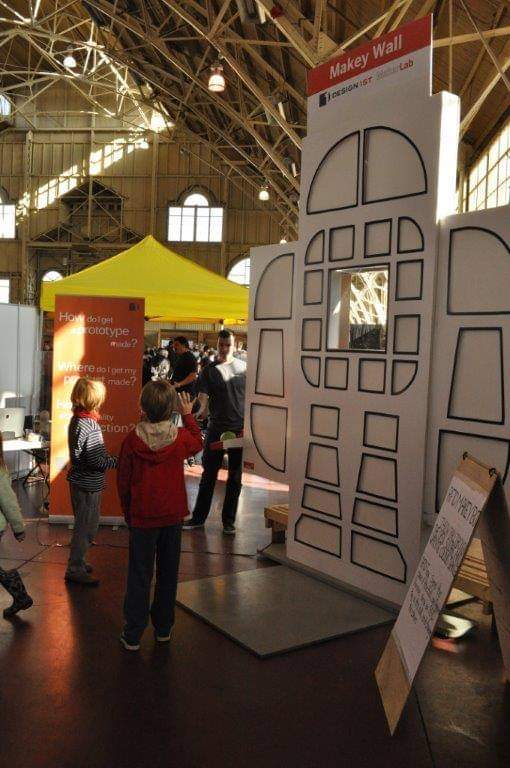
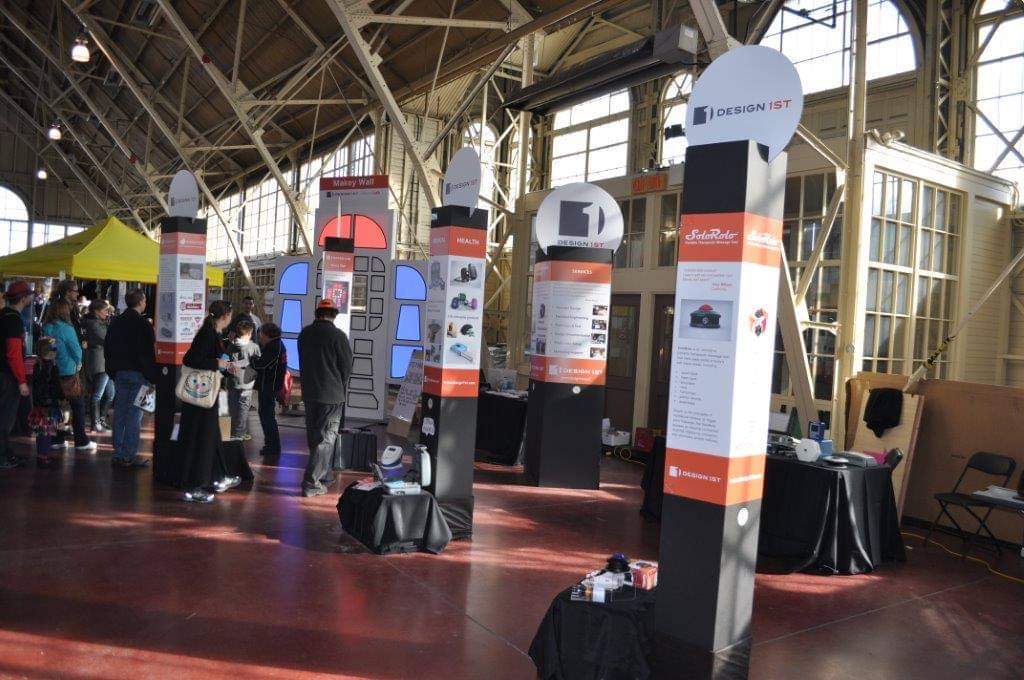
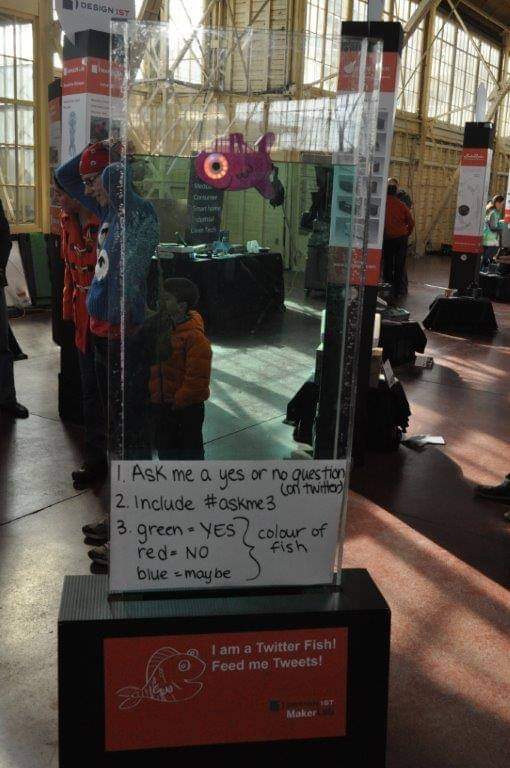
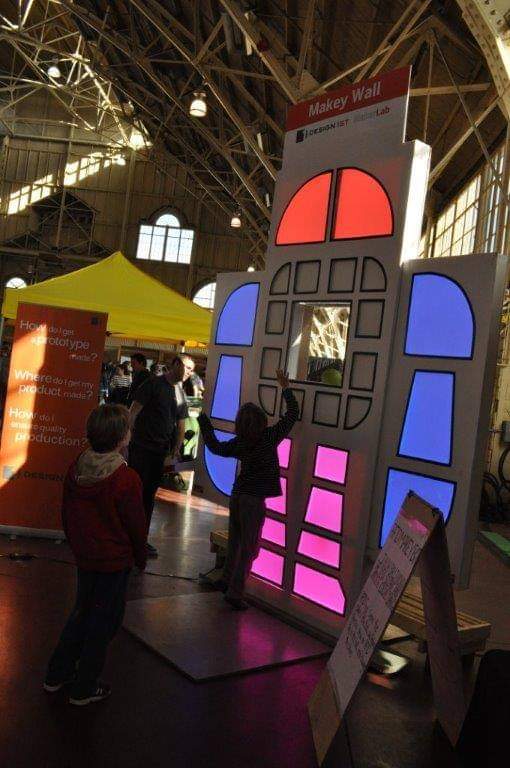
As a presenting sponsor for IoT613, we were in the trenches the week leading up to the event prepping many of the large visual attractions, including the knowledge forest, giant Makey Wall and Internet connected fish.

Each of these ideas came from the D1 Makerlab – our summer internship program, and will be featured at Ottawa’s Maker Faire as well. Check-out some of the photos from our setup for IoT613 below:

Rogers Fish TV Light
Makey Wall Lit Up
Makey Wall Lit Up
knowledge forest boxes 2
Knowledge Forest Boxes

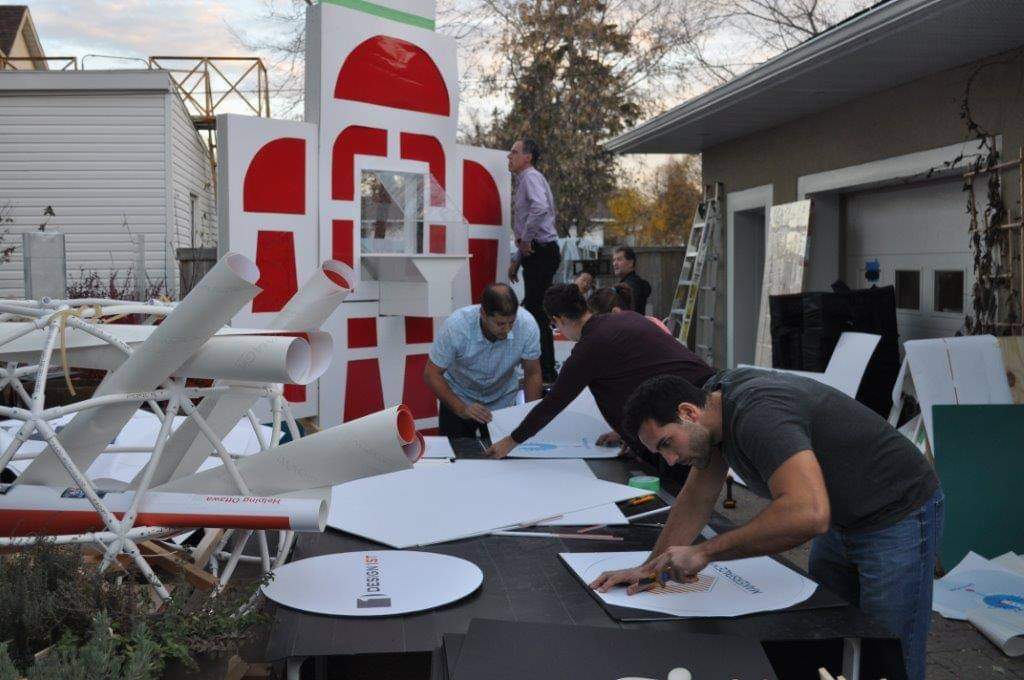
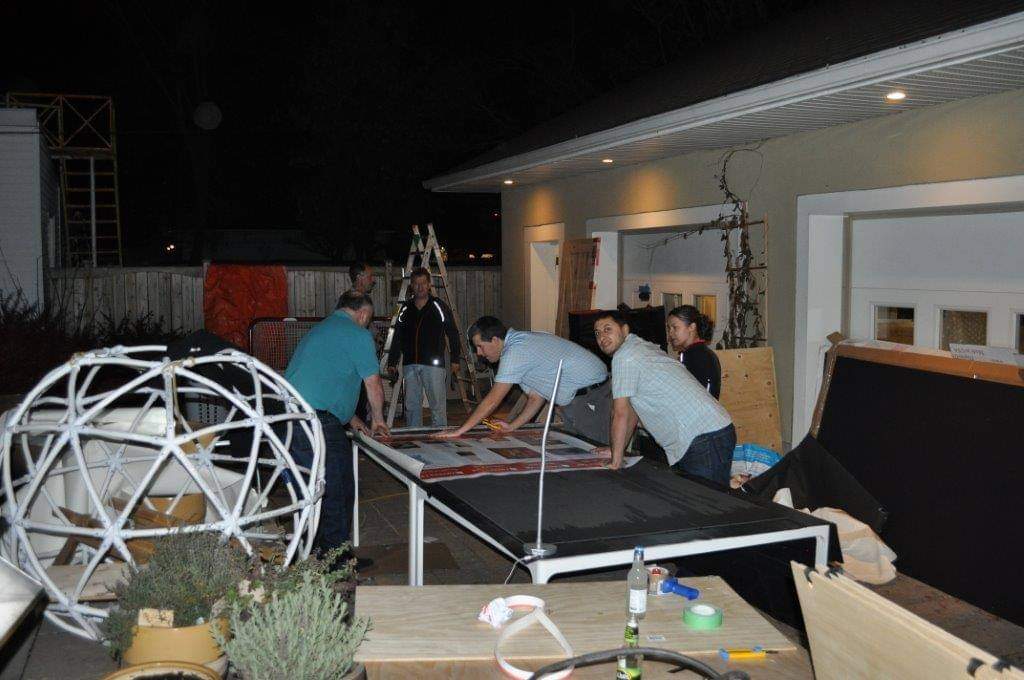
How the Makey Wall was Built:

From concept to fully functioning prototype, the Design 1st and summer D1 MakerLab team worked efficiently to get the Makey Wall ready for IoT 613! Check-out some of the photos of our progress:

Designing for IoT: Workshop


Design 1st also hosted a half-day workshop at the event with UX partners Akendi called “Designing for IoT”. The workshop featured an internet connected octopus that sensed the chlorine and ph of water, and participants were worked through the entire design process. You can watch the workshop below:

Share

Have a new product idea?

We can help take you from idea to design, prototyping, and volume manufacturing.

Published on: September 30, 2015

MIT’s New Master’s Integrated Product Design and Engineering Program

MIT’s New Master’s Integrated Product Design and Engineering Program

27 Years Experience

75+ Design Awards

1,000+ Manufactured Products

From Idea to Prototype in as Little as Six Weeks!

Ready to Start?

In order to create a successful product, which factor is the most important: that it functions well, that it appeals to the user, or that it reaches its target market? Each factor is necessary, and this intersection of mechanical engineering, industrial design and business has led to MIT creating a new Master’s program: Integrated Design & Management.

Any experienced product design firm can attest to the fact that the symbiosis of engineering, design and business is essential from the very beginning in order to avoid having to redesign the product. Yet typically, schools tend to teach very specialized knowledge, leaving the graduate with a deep understanding of a thin slice of the information pie. It is for this reason that MIT’s Sloan School of Management has partnered with MIT’s School of Engineering to provide a balanced understanding of the product development process.
 

This new Master’s track, contained within the MIT System Design and Management program, is an expansion of the widely popular Product Design and Development course. Teaching both engineers and business students to appreciate the inclusion of industrial design early in the design process is central to the ethos of this new degree. “We felt it was pretty important to validate this way of thinking at an institutional level and award a degree,” said Matt Kressy, director and creator of IDM and a senior lecturer at MIT.

The degree is a two-year program open to those with a background in engineering, industrial design or business. Through the course of the program, students are exposed to the important factors in each discipline and how they relate to the overall progress of a developing product, regardless of the student’s background. For example, “They’ll know if a particular design is valuable from a business perspective because they’ll know how to go through the right steps and involve the right people to make sure a product is profitable, that the supply chain is in place, and that they understand the market and distribution channels.”

Positions are limited in this exclusive new Master’s program, with only 20 students in its inaugural year, beginning this Fall.

Here, the program director Matt Kressy leads an information session about the program.

Share

Have a new product idea?

We can help take you from idea to design, prototyping, and volume manufacturing.

Published on: March 2, 2015